
Custom Web services
Create your own web services
Operating mode
 Cloud Suite
 On-Premises
Modules
All
Vertec offers the ability to provide externally accessible web services, the logic of which is implemented in Python 3.12. Incoming web request are processed by the Python code, allowing for flexible integrations and custom extensions, such as processing webhooks, connecting to external automation platforms, or deployment of custom API.
Create web services
For On-Premises operation
For On-Premises customers, certain prerequisites should be defined prior to deploying web services.
The following parameters are added to the Vertec.ini configuration file:
[Cloud Server
Web Services Server=True
DebugCategories=Vertec.Webservice
Note: DebugCategories=Vertec.Webservices is set in the method self.log(log_object). See the information on the method and to the log.
Note on [Notif]:
When creating a web service, it should be noted that a separate session is created for the processing of the web requests. Changes to the web service code are transmitted from the developer’s session to the web service’s session via Notif. Similarly, the fields Last access, Access log and Last error in the web service session and are sent back to the developer’s session via Notif. In this case, it may be helpful to reduce the PollInterval in it to get faster feedback. See the KB article Notif Data Update.
For Cloud Suite operation
When running Vertec in the Cloud Suite, the web services are activated by default.
Session Handling
For web service sessions, a timeout is set via the Vertec.ini file under [Cloud Server] with the following parameter Webservice Session Timeout, Standard: 10 minutes configured. If a web service session does not receive a request during the defined time, the Cloud Server sends a command to close the session. The session checks itself to see if it can be completed and remains open when actively web requests are being processed.
Create a web service script
Under Settings > Reports & Scripts > Script, create a new script. Enter the name and select Python 3 under Platform. Web services can only run with Python 3.
In the script text you enter the Python code. Here is an example code:
from vtcweb import WebService, http, get, put, post, delete, WebException

class HelloWorld(WebService):

    @post("create-todo")
    def create_activity(self):
        expected_values = {
            "title": "str",
            "text": "str",
            "date": "datetime"
        }

        try:
            values = self.parse_request_body(expected_values)
        except ValueError as e:
            raise WebException(400, str(e))

        act = vtcapp.createobject("Activity")
        act.title = values.title
        act.text = values.text
        act.createdBy = vtcapp.currentlogin()
        if values.date:
            act.dueDate = values.date

        response = {}
        response["id"] = act.objid

        return self.as_json(response)
The base module for all Python web services is vtcweb. It contains routing logic that determines which web service and feature handles the incoming web request. The base class for web services is vtcweb.WebServices and all Python web services must derive from this class.
In order for a method to be accessed via web requests, it must be annotated with so-called decorators. Each decorator corresponds to a specific type of request. The following decorators can be used:
- GET: retrieve existing data
- POST: create new data
- PUT: update existing data
- DELETE: delete the data
- HTTP: allows access to all above request types (GET, POST, PUT & DELETE)
The necessary definitions and methods for example code are implemented in the Vertec python module “vtcweb”.
Create object Web service
The next is, creating a web service under Settings > Interfaces > Web services.
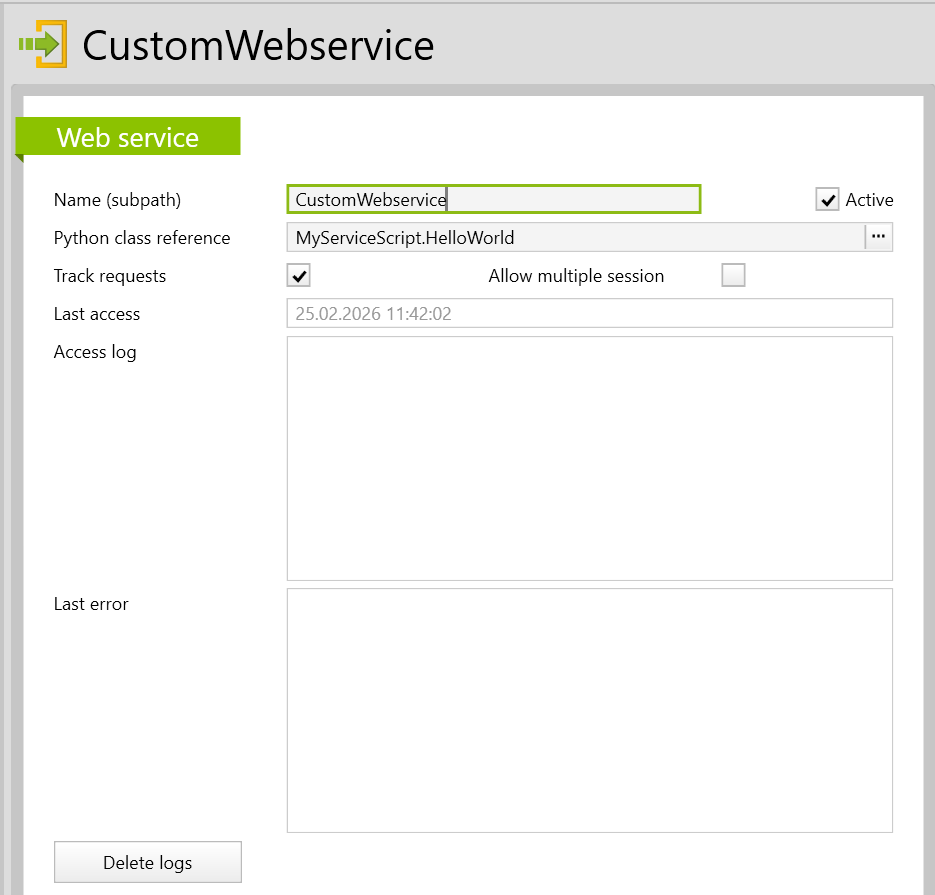
Name (subpath) |
Name of the web service, which is also part of the URL of the web server. |
Python class reference |
The designation of the script entry and the class to use. |
Active |
Must be activated. Web requests can only be processed if a web service exists and is active. |
Track requests |
If this checkbox is active, the print and self.log messages as well as the time information of the web service will be entered in the field Access log. This helps with setting up and testing the web service. For normal operation, the checkbox can be deactivated. |
Allow Multiple session |
If this checkbox has been activated, analogous to the Article xml server, the VertecSessionTag can be added to the web request header in order to create specific sessions. |
Last access |
If there is a valid API token and a corresponding script entry for the web service, this field saves the current time regardless of whether the web service is active or valid, and regardless of whether the web request was successful or not. |
Access log |
If the checkbox Track requests is active, the print and self.log messages and times are displayed after each incoming web request. |
Last error |
This field always logs an error that occurred and saves the current time of occurrence in the first row. It saves errors that are not already clearly explained by the HTTP status. For example, the |
Delete logs |
The logs are automatically overwritten with current entries until the next request. Alternatively, the entries can be manually cleared using the Delete Logs button on the detail page or in the actions menu. |
Conditions for a proper response
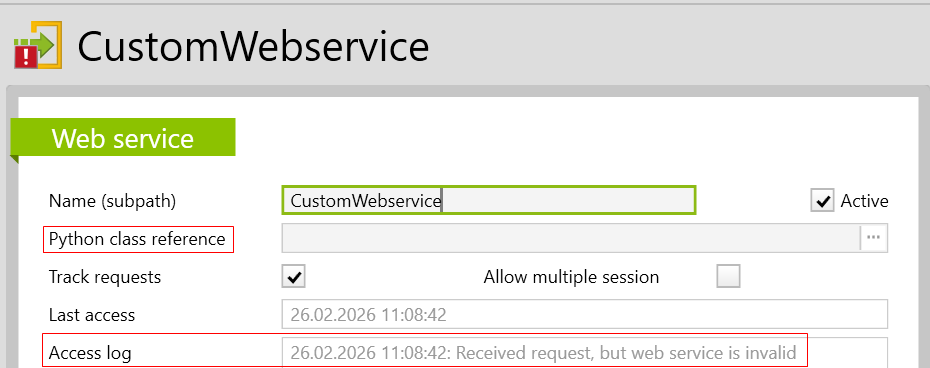
An empty or inaccurate python class reference causes the entry to be shown as invalid, and when attempting to access the web service, the Status 404 NOT Found is returned. If previously the field Track requests has been activated, a note appears under access log in case of an invalid web service:
User right: Execute web services
In order to enable or block the create or execution of the web services, two options are possible to apply:
-
The corresponding user right can be allowed or denied to the responsible user groups.
-
The corresponding object right can be defined for the folder Web services, which can also be allowed or denied.
This user right is assigned by default to the administrators and standard users user groups.
Submit WebRequest
Web services always run via the login of a user. In order for Vertec to identify a user and check whether the user is allowed to run the web service, authentication is necessary. For the web services, this is done via an API token, which can be generated in Vertec. The API token can be passed either as a header or via a query.
Authentication via header
The web service checks the identity via a bearer token.
This is transmitted in the HTTP header under Authorization: Bearer <apiToken>.
Authentication via Query
The query must have a key with the API token as value and be added in the URL: ?apiToken=<apiToken>.
Example: http://<host>/api/webservice/<Name (Subpath)>/<method-name>?apiToken=<apiToken>
This type of authentication is useful when there is no way to define a header for the web request, for example, if you are using a web service to respond to webhooks.
Error messages
If the API token is invalid or cannot be assigned to an active user, the web service returns the error message Status 403 Forbidden.
If the user does not authorize to run the web service, the error message Status 403 Forbidden is returned.