
Vertec REST API
How to work with the REST API implemented as a web service to Vertec
Operating mode
 Cloud Suite
 On-Premises
Modules
All
Vertec provides a generic REST API to Vertec as a Web Service with version 6.8.0.17.
It is called REST and can be found in the folder Settings > Extensions > Web Services:
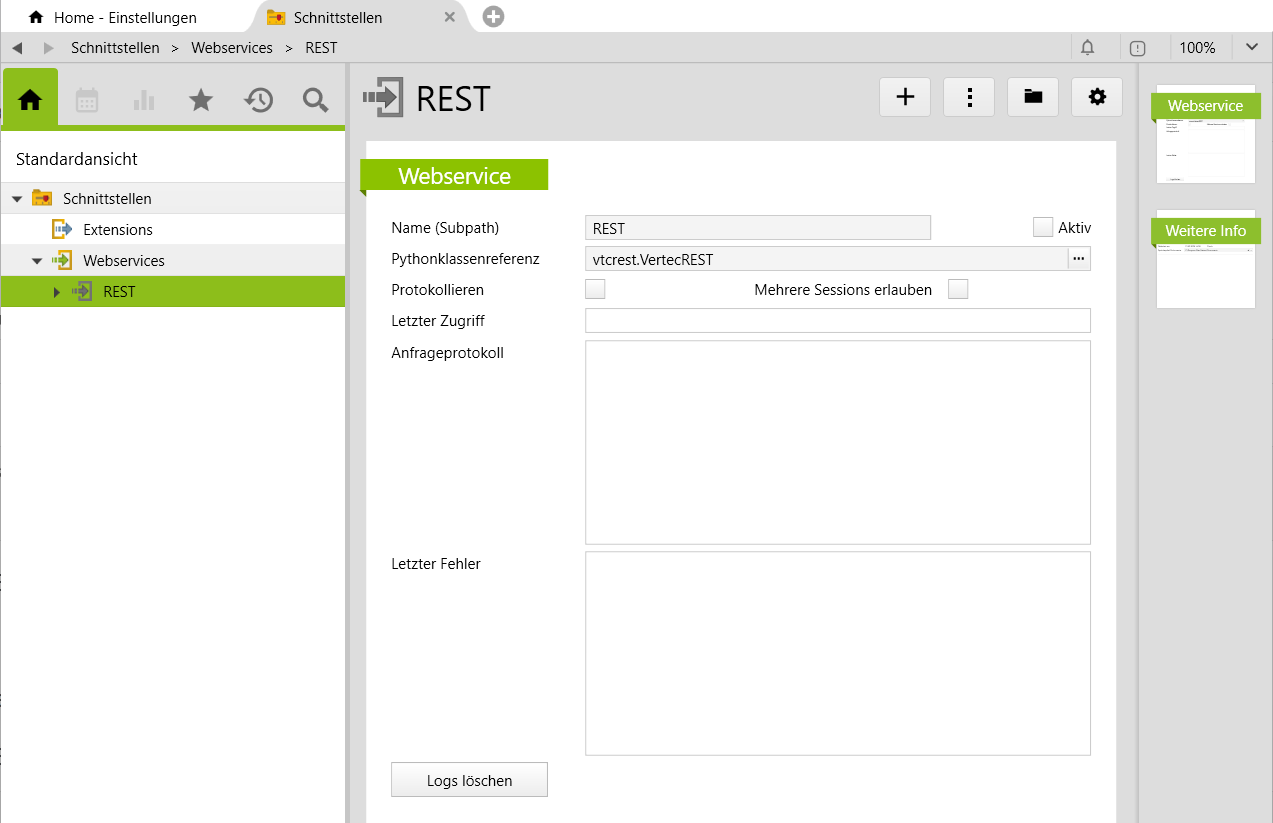
The REST web service is delivered inactive. To activate and use it, the same conditions must be met as for all web services (user rights and API tokens are present).
Addressing Vertec via REST API web service
The call is made via <ServerURL>/api/webservice/REST.
The Vertec objects can be accessed via /objects Objects can be queried (GET), changed (PUT), created (POST) or deleted (DELETE).
The current logged-in user is provided by the following endpoint: /functions/currentuser. For this purpose, the query parameters can optionally be functions, result_members and bi_measures(see the sections Features Return Values and Bi data (measures)).
Query Objects (GET)
Query individual objects
- Internal id:
/objects/1665 - Via Entry id: For the query via entry ID the second parameter must be the class name (in German or English), followed by the entry ID:
/objects/Administrator/UserAdmin.
Global queries
The data can also be queried globally. Directly with a member search or also via OCL or SQL.
For this purpose, a query is placed directly on the class, i.e. on /objects/Project. The query starts with a ?, followed by the corresponding query parameters. Several query parameters are & attached.
- Query of members - attributes (incl. custom field items) and associations (incl. custom links): With the query parameter
query_memberthe member is specified, withquery_valuethe searched value. For each queried member, the combination ofquery_memberandquery_valuenumbered:query_member0andquery_value0,query_member1andquery_value1etc.Supported operators (as prefix in value): =, <, >, <=, >= for integer, date, datetime, currency.
- Query of an attribute. As query_value, the searched value is entered, depending on the data type of the member:
/objects/Project?query_member0=code&query_value0=com%searches for projects whose code begins with com. - Query an association. As
query_valuethe internal ID of the object sought is specified:/objects/Project?query_member0=type&query_value0=179. - Only persistent members can be queried. Member searches are always global. If an ID is given for a single object, it is ignored.
- Query of an attribute. As query_value, the searched value is entered, depending on the data type of the member:
Via SQL: For SQL, the query parameter
sqla global SQL query is sent:/objects/Project?sql=bold_id IN (SELECT project FROM openservice).- Via OCL: Using the query parameter
oclan OCL expression is discontinued:/objects?ocl=user->select(active).- Unlike SQL expressions, OCL expressions can also be placed on a single object:
/objects/1665?ocl=openservices.
- Unlike SQL expressions, OCL expressions can also be placed on a single object:
Return values
The result contains an object or a list of objects. By default, each result object returns the internal ID (objid), the String Representation of the object (stringrepresentation), the class name (classname) and whether the object is valid (isvalid) and the reason (hintisvalid), if an object is invalid.
To output additional members, you can use the query parameter result_members a comma-separated list of the corresponding members is given: /objects/1665?result_members=code,description,regarding. The specified members are output for each result object.
Features
About the Parameter functions can call features on objects and can be used for users, projects and phases. The parameter must be given as a query parameter and can be comma-separated comparable to query parameters result_members (see last section Return value).
The example retrieves the standard hours and working time of the logged-in user with the time and date in minutes and the month of January 2026.
/objects?ocl=user&result_members=loginname,abbreviation&functions=getStdHours,getWorkingHours&date_from=2026-01-01&date_till=2026-01-31
Here is an example of a request with functions and result_members:
/objects?ocl=user&result_members=loginname,abbreviation&functions=getStdHours,getWorkingHours&date_from=2026-01-01&date_till=2026-01-31
Result:

[
    {
        "objid": 506,
        "stringrepresentation": "Administrator",
        "classname": "User",
        "isvalid" true,
        "hintisvalid": "",
        "loginname": "Administrator",
        "abbreviation": "",
        "getStdHours": 11220,
        "getWorkingHours": 60
    },
    … // weitere User
]
Listed below are all the values that apply to functions can be called. Many of these values are the same and work in the same way as the Ocl operators for users These are linked accordingly.
| Values for users | Significance |
|---|---|
getStdHours |
Standard hours in minutes |
getWorkingHours |
Working time in minutes |
getOvertimeCarryover |
Overtime balance in minutes by date until yesterday(-1), except on end date a bring forward is entered, then this bring forward is output. |
getOvertimeCarryoverDate |
Date of the last overtime report before the end date |
getOvertimeBalance |
Overtime balance in minutes by end date |
getVacationCredit |
Holiday credit in minutes by time (from, to) |
getVacationTaken |
Vacation reference in minutes by time (from, to) |
getVacationCarryover |
Vacation balance in minutes by date until yesterday(-1), except on end date a presentation is brought forwardentered then this presentation is brought forward. |
getVacationCarryoverDate |
Last vacation carryover in minutes before the end date. |
getVacationStart |
Start date of the holiday period |
getVacationEnd |
End date of the holiday period |
getVacationBalance |
Vacation balance in minutes by end date |
getVacationBalanceAccrued |
Accrued vacation balance including holiday credit in minutes |
getSalary |
Salary by time (from, to) |
getOverheads |
Labor costs by time (from, to) |
getAssignedStdHours |
Standard hours in minutes by time indication (from, until) only on the basis of the specifications |
getAssignedStdHoursGroup |
Target standard hours in minutes per time (from, until) only based on user group settings |
getStdHoursOnlyGroupAbs |
Standard hours in minutes per time indication (from, to) of the user group including absences |
getEmploymentLevel |
user’s employment level by end date |
getAbsenceTimeOff |
Absence with type indication (code) by time indication (from, until) |
getStdHoursGroup |
Standard hours in minutes per time indication (from, to) of the user group in minutes including group absences |
isBlockedDate |
Returns True/False depending on whether end date is locked on service and expense. |
enteringprojects |
List of projects for which the user may entered services and expenses |
currentAbsences |
List of absences by end date |
getTrackingUsers |
List of users who are allowed to enter services, expenses and expenses. |
| Values for projects | Significance |
|---|---|
enteringphases |
List of project phases on which the user may entered services and expenses. |
| Values for Phases | Significance |
|---|---|
enteringservicetypes |
List of activity types on services for phases that the user is allowed to time track for service recording. |
enteringexpensetypes |
List of phase expense types that the user is allowed to use for expense recording. |
BI data (measures)
The API can directly provide BI measures for an object.
The parameters are
-
bi_measures=MinutesExt,MinutesInt,...(internal BI names) -
bi_date_from=2026-02-01 -
bi_date_till=2026-02-28 - optional
bi_currency=CHF(Currency code) - optional
projection_dimension=Project(e.g. a second dimension like customer & phase)
Change Data (PUT)
A PUT call adjusts an existing Vertec object. The fields to be changed are passed in the JSON body. The object ID comes from the URL and the body contains the new values for the desired members.
- PUT
/objects/Administrator/UserAdminor/objects/1665 - Body: JSON object with fields to change
{
  "abbreviation": "AD",
  "level": 500,
}
For each field, the API checks whether it is a valid, persistent field of the class.
Data types are validated and converted (e.g. date in ISO format, booleans, integers, currencies).
For Associations:
- Single-link: an integer (objid)
- Multi-link: an integer or a list of integers (objids)
On success, as with a GET query, a result containing the updated object is returned.
Create objects (POST)
a POST call creates a new Vertec object. The class of the object is defined via the URL and the values of the fields are passed in the JSON body. Unlike PUT, this is not about updating an existing object, but about creating a new one.
- POST
/objects/Projectcreates a new project
The JSON body looks like PUT and writes the appropriate members to the newly created object. If an error occurs (e.g. invalid value or missing right), the newly created object is deleted and an error message is returned.
If successful, the response corresponds to the output of a GET call for the newly created object.
Deleting Objects (DELETE)
a DELETE call permanently deletes an existing Vertec object. The instance to be deleted is deleted via the objid or the entryID identified in the URL.
- DELETE
/objects/1665or/objects/Administrator/UserAdmin
The specified object is searched for and then deleted.
If rights are missing, HTTP status is 403 Forbidden returned and the HTTP status on other errors 400 Bad Request.
On success, no object is returned as a JSON response, but only a corresponding HTTP status is returned.
Writing documents
The API can also save files (e.g. Pdf or images) to the following Vertec objects. The binary data of the file are transmitted Base64-encoded in the JSON body of a PUT or POST call.
- Activities
– Expense expenses
Accounts payable
In the JSON body of a PUT or POST call, the corresponding document field is filled with a Base64-encoded string. The API decodes this Base64-encoded string and saves the file internally in its own document object.
Special case for activity: For activities, the field activity additionally documentfullname required. This field contains the file name including the file extension so that Vertec knows the name of the stored document.
Example: Document attached to activity attachments
- PUT
/objects/Activity/12345 - JSON Body:
{
  "document": BASE64DATEN
  "documentfullname": "Besuchsbericht.pdf"
}
In this example, the activity with the objid 12345 saves a document with the file name visit report.pdf. The API internally calls the appropriate document function of the activity class and creates a DocumentData object with the passed binary data.
Example: Attach a document to an invoice
- PUT
/objects/Expenses/9876 - JSON Body:
{
  "document": BASE64DATEN
}
Here a document is saved for the invoice with the internal ID 9876 by using the field document with the Base64-encoded content.
Logging API access
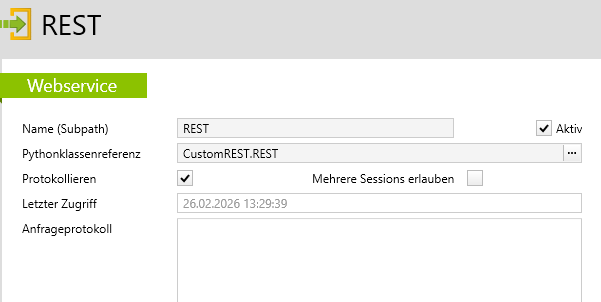
The web service class VertecREST has a method onrequest(self), which is called on each WebRequest. In the base implementation, this method has no feature. You can override this method in a derived class to perform a defined feature, such as logging, for each request. Then swap the class reference in the Web service (vtcrest.VertecREST) against your new class reference. Below is an example of onrequest(self) Implementation:
The script:
from vtcrest import VertecREST

class REST(VertecREST):

    def onrequest(self):
        method = self.http_method
        path = "/".join(self.path_parameters)
        query = self.querystring
        self.log("Received request: {} {}?{}".format(method, path, query))
The REST web service entry:
Error behavior
The API typically responds with the following error codes:
400 Bad Request
This status code is used for all technical and technical errors caused by incorrect entries or invalid requests. Typical causes are:
- Invalid class or field names (e.g. “Attribute 'xyz’ not found for class Project”)
- Incorrect data types (e.g. “Value 'abc’ for member 'startdate’ could not be converted to 'date’)
- Invalid object IDs (e.g. “No Vertec object was found with objid=999999”)
- Missing or incorrect mandatory parameters (e.g. “'customer’ Inf required as parameter”)
- Syntax errors in OCL/SQL expressions
- Invalid Base64 Data on Documents
- Logic errors (e.g. “Association 'customer’ must be a multi-link, but Inf a single-link”)
403 Forbidden
This status code signals missing user rights for the requested operation. Common causes are:
- Lack of read permission for objects/fields (“Read access denied while reading member 'salary’)
- Write access denied when writing value '1000' for member 'budget’
- SQL query rights missing (“getwithsql failed – no SQL query right”)
- OCL execution rights are missing
- BI data access not allowed
- Access to WrapperLinkTypes is denied
The error messages usually include:
- affected class and internal ID
- affected field/parameter
- expected data type/value
- Original error text from Vertec (e.g. from `evalocl`, `bigetdata`, `getwithsql`)
For correct requests, HTTP is always used 200 OK returned (also with DELETE).
The definitions necessary for using the REST API are implemented in the Vertec python module “vtcrest”.