
How to work with the REST API implemented as a web service to Vertec
 Cloud Suite
 On-Premises
Vertec provides a generic REST API to Vertec as a Web Service with version 6.8.0.17.
It is called REST and can be found in the folder Settings > Extensions > Web Services:
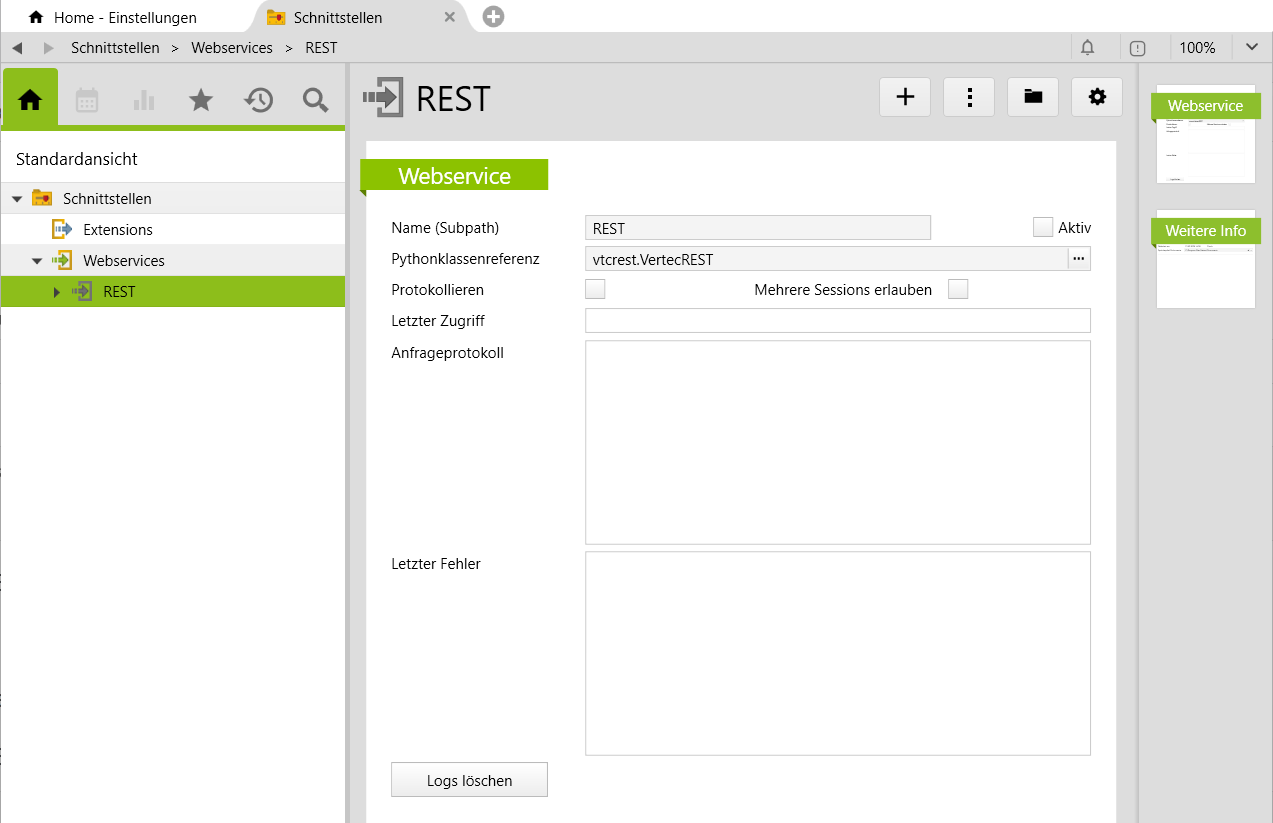
The REST web service must be active to use it, and it must meet the same conditions as all web services (user rights and API tokens present).
For developers there is also a swagger file:
| Vertec version | File |
|---|---|
| 6.8.0.20 | vtcrest.openapi.yaml |
| 6.8.0.21 | vtcrest.openapi-6.8.0.21.yaml |
| 6.8.0.23 | vtcrest.openapi-6.8.0.23.yaml |
The call is made via <ServerURL>/api/webservice/REST.
Vertec objects can be accessed via /objects/<classname>. Object can be queried (GET), changed (PUT), created (POST) or deleted (DELETE).
Note on specifying the class name: In earlier Vertec versions, individual objects could be queried directly without specifying the class name, only with their ID. Starting with Vertec 6.8.0.20, this is no longer possible, the class name must always be specified. The case of the class name (in German or English) does not Role at this point.
For this purpose, the query parameters functions, bi_measures, result_members and result_ocl can be optionally entered (see the sections Features, Bi data (measures) and Return Values).
In order to make requests to the REST API, non-administrators need the following Rights:
Webservicedefinition/objects/project/1665
ids in a comma-separated list: /objects/project?ids=1665,1669/functions/currentuser/identify/objid as of Vertec 6.8.0.20.As of Vertec 6.8.0.24 a full-text search can be initiated via the endpoint /fulltextsearch. The following query parameters are available:
search_term: String. Search term to search forlanguage: Optional. String. Possible languages are DE, EN, FR, IT, NL. The language is only used if it is defined as the Search Language and there is an index for it. Otherwise, the search is performed in the Surface Language, if available, otherwise in the Default Language.date_from, date_till: Optional. Date values in ISO 8601 format (2026-03-31) to limit the search to a specific period.only_active: Optional. Boolean. The default value is True and only active objects are searched. If you want to search for inactive objects as well, you can pass this parameter with False.class_filter: Optional. List of comma-separated class names. The search is then performed only in these classes.
In the background, a vtcapp.search() is called with this information. There you will also find the members of the return values.
A global query of the data can be done via member search, via OCL or via SQL.
To do this, a query is placed directly on the class, e.g. on /objects/Project. The query starts with ?, followed by the corresponding query parameters. Several query parameters are appended with &.
A query is mandatory. It is not possible to load all objects of the class without a query.
An authorization check is then performed for the objects found. Object on which the logged-in user does not have read rights are removed from the list.
Member searches are always global. If an ID is given for a single object, it is ignored.
Members are attributes (incl. Custom Field Items items) and associations (incl. Custom Links). All Members can be found in the Vertec Model Browser. Only persistent members can be queried.
The query parameter query_member specifies the member name, query_value specifies the searched value. For example, custom field items are queried via the additional field name and custom links via the role designation.
For each member queried, the combination of query_member and query_value is numbered:
query_member0 and query_value0,query_member1 and query_value1, etc.When querying an attribute, the desired value is entered as query_value, matching the data type of the member:
/objects/Project?query_member0=code&query_value0=com%
searches for projects whose code begins with com. Support Operators are = and <, >, <=, >= for the data types Integer, Date, Datetime and Currency.
When querying an association, the internal ID of the object is specified as query_value:
/objects/Project?query_member0=type&query_value0=179.
With the query parameter sql a global SQL query can be made: /objects/Project?sql=bold_id IN (SELECT project FROM openservice).
With the query parameter ocl, an OCL expression is sent: /objects/user?ocl=user->select(active).
Unlike SQL, OCL expressions can also be applied to individual objects: /objects/user/1665?ocl=openservices.
The association query parameter can be used to call a sublist on the query result. The association is specified by the member name of the association, regardless of whether it is an association in the model or a custom link.
objects/Project/1665?association=invoice
The return values then refer to this sublist.
The result contains an object or a list of objects. By default, each result object returns the internal ID (objid), the object’s String Representation (stringrepresentation), the class name (object_classname, in versions before 6.8.0.23 classname) and, for user entries, whether the object is valid (isvalid) and the reason (hintisvalid) if an object is invalid.
To output additional members, the result_members query parameter can be used to specify a comma-separated list of members with the corresponding member name: /objects/project/1665?result_members=code,description,regarding.
The same applies to custom field items that are output by the custom field name, as well as custom links that are output the role designation. The specified members are output for each result object.
As of Vertec 6.8.0.20, result_ocl can also be used to run OCL on the result objects. The query parameter expects a designation for the output and an OCL expression for the value: ?result_ocl:anzahlleistungen=offeneleistungen->size.
The query parameter can be used to call features on users, projects, and phases. Multiple features can be specified comma-separated.
The parameters date_from and date_till can be used to pass start and end dates as required. These must be specified in ISO 8601 (2026-03-31), regardless of the locale settings.
The example calls up the standard hours and working time of the logged-in user in the month of January 2026:
/functions/currentuser?functions=getStdHours,getWorkingHours&date_from=2026-01-01&date_till=2026-01-31
{
    "object_classname": "User",
    "stringrepresentation": "Christoph Keller",
    "objid": 1588,
    "isvalid": true,
    "hintisvalid": "",
    "getStdHours": 10710,
    "getWorkingHours": 10785
}
All features that can be called via functions are listed below.
| Class | feature | description | ||
|---|---|---|---|---|
Activity
|
documentplaintext |
As of Vertec 6.8.0.21. Return the plain text of the attached document, similar to the Python feature vtcapp.extractplaintext(), to make documents easier to search. |
||
Project |
enteringphases | List of phases of the project on which the user may entered services and expenses. | ||
User |
enteringprojects |
List of projects for which the user can enter services and expenses. |
||
| The following features correspond to the Ocl operators for users and are linked accordingly: | ||||
| getStdHours | getVacationCarryoverDate | getAssignedStdHoursGroup | ||
| getWorkingHours | getVacationStart | getStdHoursOnlyGroupAbs | ||
| getOvertimeCarryover | getVacationEnd | getEmploymentLevel | ||
| getOvertimeCarryoverDate | getVacationBalance | getAbsenceTimeOff | ||
| getOvertimeBalance | getVacationBalanceAccrued | getStdHoursGroup | ||
| getVacationCredit | getSalary | currentAbsences | ||
| getVacationTaken | getOverheads | getTrackingUsers | ||
| getVacationCarryover | getAssignedStdHours | isBlockedDate | ||
Phase |
enteringservicetypes | List of service types that the user is allowed to use in the time tracking at this phase. | ||
| enteringexpensetypes | List of expense types that the user is allowed to use when entering expenses at this phase. | |||
Resource planning |
getResPlanMinutes |
As of Vertec 6.8.0.24. Shows the planned time of an user in minutes. Example: |
||
| getResRsrcMinutes |
As of Vertec 6.8.0.24. Shows the total resource time of an user in minutes. Example: |
|||
The REST API can provide Bi measures for the objects. The parameters for this are:
bi_measures: Specify the internal name of the BI measure. Multiple BI measures can be specified comma separated.bi_date_from: Start date in ISO 8601 format (2026-01-20)bi_date_till: End date in ISO 8601 formatbi_currency: Optional. For values of the units Betrag or Stundensatz, a currency code can be optionally entered if the output is not to be in the key currency. See also the article Business Intelligence.projection_dimension: Optional. Here you can specify a (single) dimension by which the result is grouped (e.g. "Projekt,Projektbearbeiter" ). A detailed description can be found in the article BI API./objects/user/1588?bi_measures=FeesExt,FeesExtCharged&bi_date_from=2025-01-01&bi_date_till=2025-12-31
{
    "object_classname": "User",
    "stringrepresentation": "Christoph Keller",
    "objid": 1588,
    "isvalid": true,
    "hintisvalid": "",
    "FeesExt": 68681.25,
    "FeesExtCharged": 34013.75
}
A PUT call adjusts an existing Vertec object. The fields to be changed are passed in the JSON body. The object ID comes from the URL and the body contains the new values for the desired members.
/objects/User/UserAdmin or /objects/User/1588Each row contains a member name as a string, followed by the value to be entered, corresponding to the data type of the field to be set. Datum types are validated and converted (e.g. date in ISO format, booleans, integers, currencies).
{
  "abbreviation": "AD",
  "level": 5270
}
For each field, the API checks whether it is a valid, persistent field of the class. Custom field items are treated equally.
For Associations, the internal ID (objid) of the object to be linked is passed as a value.
{"Verwaltungsrat": 47083}To remove an association, starting with Vertec 6.8.0.21 you can simply specify -1 instead of the internal ID. This only works with 1:n links and custom links. m:n links cannot be removed via REST API.
On success, as with a GET query, a result containing the updated object is returned.
a POST call creates a new Vertec object. The class of the object is defined via the URL and the values of the fields are passed in the JSON body. Unlike PUT, this is not about updating an existing object, but about creating a new one.
/objects/Project created a new projectThe JSON body looks like PUT and writes the appropriate members to the newly created object. If an error occurs (e.g. invalid value or missing right), the newly created object is deleted and an error message is returned.
If successful, the response corresponds to the output of a GET call for the newly created object.
As of Vertec 6.8.0.21, an OCL expression can be checked for its validity with the endpoint /validateocl. Pass values are:
POST {{BaseURL}}/validateocl
JSON Body:
{    "classname": "Project"
     "expression":  "invoices->select(paid).total->sum"
}
The return value is an object with the same attributes as described in the Python feature vtcapp.validateocl().
a DELETE call permanently deletes an existing Vertec object. The instance to be deleted is identified by the objid or entryID in the URL.
/objects/activity/13787The specified object is searched for and then deleted if possible.
On success, no object is returned as a JSON response, but only the HTTP status 200 OK is returned.
As of Vertec 6.8.0.23, it is possible to write address information and communication channels in a simple way, without having to know and consider the Uml model addresses. The standard... attributes are written on the address entry, and the REST API creates the corresponding objects in the background automatically or changes them accordingly. The following attributes (all string values) can be written as follows:
Documents (e.g. Pdf or images) can also be saved on Activities, Expense and Accounts Payable payable via the REST API.
In the JSON body of a PUT or POST call, the corresponding document field (member name) is filled with a Base64-encoded string (value). The API decodes this Base64-encoded string and saves the file internally in its own document object.
Example: Attach a document to an invoice
/objects/Invoice/9876{
"document": BASE64DATEN
}Here, a document is saved for the invoice with the internal ID 9876 by filling the field document with the Base64-encoded content.
Special case for activity: For activities the field documentfullname is also required. This field contains the file name including the file extension, so that Vertec knows the name of the stored document.
/objects/Activity/12345{
"document": BASE64DATEN
"documentfullname": "Besuchsbericht.pdf"
}In this example, the activity with the objid 12345 saves a document with the file name visit report.pdf. The API internally calls the appropriate document function of the activity class and creates a DocumentData object with the passed binary data.
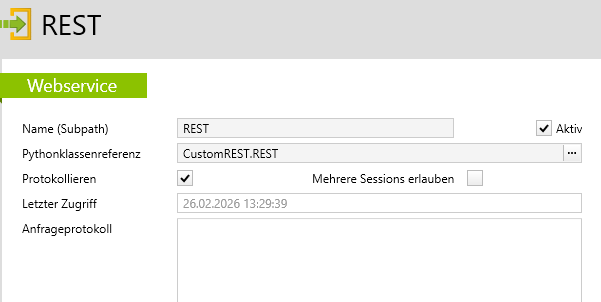
The definitions necessary for using the REST API are implemented in the Vertec python module “vtcrest”.
The VertecREST Web service class has a method that is called on each WebRequest. In the base implementation, this method has no feature. You can override this method in a derived class to perform a defined feature, such as logging, for each request. Then replace the class reference in the Web service (vtcrest.VertecREST) with your new class reference. The following is an example of a onrequest(self) implementation:
a Script called Customrest (requires extended user rights):
from vtcrest import VertecREST

class REST(VertecREST):

    def onrequest(self):
        method = self.http_method
        path = "/".join(self.path_parameters)
        query = self.querystring
        self.log("Received request: {} {}?{}".format(method, path, query))
The REST web service entry:
The REST API typically responds with the following HTTP error codes:
400 Bad Request
This status code is used for all technical and technical errors caused by incorrect entries or invalid requests. Typical causes are:
403 Forbidden
This status code indicates missing user rights for the requested operation. Common causes are:
The error messages usually include:
For correct requests, HTTP 200 OK is always returned (including DELETE).