
The Paperless Office: Combining Vertec and DMS Solutions
The paperless office is no longer a dream, but a lived reality. A customer relationship management system (CRM) ensures the digital and seamless customer and mandate history. Extended by a suitable document management system (DMS) for the management of digital documents, the entire day-to-day office can be digitized. Learn more about the implementation of the paperless office through the combined use of Vertec with DMS solutions in this article!
That’s what this post is about:
- The paperless office and its benefits
- Digital document management
- Transferring CRM and ERP documents to the DMS
- Digital alternatives to paper notes
1. The paperless office and its advantages
Everyone knows it: You are desperately searching for a file, a document or a photo that your colleagues have digitally stored on the server. The entire folder structure is turned upside down, but you still do not get to the desired object and lose a lot of time in the process. If you use a DMS solution for file management, you can increase your efficiency significantly. By marking the files with metadata, for example, the marketing department can quickly and easily access and edit all the photos of the management team. If the files have been marked and tagged with relevant keywords, all relevant photos are immediately shown during the search.
Working from anywhere is now the norm. The changeover to the paperless office closes the gaps in the processes and allows access on the go or from the home office. If, for example, expense receipts can be entered digitally by all employees, the administration can process them more quickly. This digitization thus creates a real labor saving for all parties! For more information, see our blog article “Expense automation with the vertec phone app”.
Depending on the country, very specific rules apply to the archiving of data. Complete and legally compliant archiving is often a challenge. This obligation can be fulfilled with a document management system configured to your industry and needs. If the DMS works hand in hand with the CRM and ERP solution used, such as Vertec, compliance is fully implemented in all processes. Since version 6.8.0.16, we have been offering document sealing, enabling our customers to archive their accounting documents as easily applicable, cost-effective and legally compliant as possible – especially with regard to accounts payable and incoming invoices.
The sealing function is available free of charge to all Vertec customers with a licensed module “Procurement & Purchases”. The sealing is done by a cloud service of ours, but this is designed to be very privacy friendly: The actual document (i.e. the PDF) is not sent to this cloud service, but only a hash of it. The fact that a document has been sealed is visible directly in Vertec and, as already mentioned, can also be confirmed with Acrobat Reader or online validators.
2. Basics of digital document management
In a document management system, you can immediately find the documents and files you are looking for. The decisive difference to a normal drive: the What is at the center, not the Where. It is not relevant where the document is stored, but what you are looking for. Specifically, you are looking for a Shareholder Retention Agreement and not the location where it was saved and stored.
Transparent document history
No more numerous file versions! In every company there are the very creative people who save a revised document with “Contract-new.docx” or “Contract-old-2.docx”. And no one has a clear view of which document version is the current valid.
Who changed a document and when? In the DMS, all changes can be tracked in real time. Users can enter additional comments per file version. This type of versioning saves resources. And even though storage space is usually cheap nowadays, it plays a role, for example, when using a DMS solution in the cloud.
From paper to file
It cannot be completely avoided – some documents are obtained in paper form. The path from the file to the DMS is via the scanning of these documents. Depending on the volume, different methods are available for this.
- If you rarely struggle with paper and do not receive bound documents, you can work with a simple document scanner. These devices can also be used mobile with a battery and fit in a carrying bag.
- Professional scanners for stationary use are the middle way.
- For a high scan volume, external service providers can be commissioned to digitize even complicated folders.
All solutions should always consider the route from paper to the document management system. What software does the device or service offer? Is there a suitable extension or alternative transfer options to my DMS?
3. Transfer CRM and ERP documents to the DMS
Vertec and DMS, this combination is available in two ways. Either you use Vertec’s integrated document storage. Documents are stored directly in the Vertec database. Big Advantage: Full-text search and future AI features have full access to the data. Or you use way two: You connect a DMS. The most common integrations existed with SharePoint Online, iManage and M-Files.
Vertec makes it easy to create mandate-related or customer-related documents such as letters or Invoices. The documents are automatically stored at the defined location with the help of the Document Management and at the same time linked to the correct location in the CRM. With the help of so-called add-ins, files from Word or Excel can also be assigned to a case or a contact with a few clicks. The Vertec Outlook App integrates emails seamlessly into Vertec.
Any other files, such as scanned documents, can be linked in the CRM and easily opened later. For each document, comments can also be added, responsibilities and deadlines can be assigned, or other activities can be defined. In this case, the document then appears as scheduled work in the respective employee’s task list.
Documents created in the CRM software, such as letters or invoices, are saved in the DMS, including the metadata. The CRM knows the location. The document can thus be found and opened directly from the CRM or in the DMS. The CRM has the complete customer and mandate history, the DMS knows the metadata, which further simplifies the search for a document.
When a mandate is opened, the CRM first selects various attributes and parameters such as case type, customer, currency or language. This metadata can be automatically transferred to the DMS – together with user rights if necessary. User rights are important when the group of employees who are allowed to access a case and the corresponding documents (e.g. in the case of M&A mandates) is small. When a mandate is opened, it is also defined what happens in the DMS if the attributes or parameters change in the CRM or if a case is completed (archiving).
When you maintain your data with the necessary discipline, you have a seamless digital customer and mandate history. When Vertec and DMS work together, you benefit from the strengths on both sides and create additional value.

4. Digital alternatives to paper notes
Many of us have become accustomed to notepads in the office over the years. What alternatives does digitization offer for paper enthusiasts? We have summarized the most important information:
To-Do apps and tools such as Asana or Wunderlist are ideal for taking notes in meetings. After the conversation, the content can be edited and then distributed to colleagues or enriched with additional data such as screenshots or links. Vertec offers Activities for these use cases. These can be assigned to addresses or cases and know the status open and completed. This makes it easy to manage open tasks.
Minutes can be processed well in wiki solutions such as Confluence. Typing can already be done during the meeting. With a few minutes of post-processing time, the minutes are then accessible to all authorized parties and can be commented on and further processed there later. The typing of paper minutes is eliminated and the way to the document management system is open. Once again, the main advantage of a DMS takes effect: you are looking for the minutes, not the storage location.
For a long time, there was no good alternative to pen and paper for graphic tasks. This has changed in recent years, as many vendors have discovered the market for themselves. In addition to Microsoft and Apple, various vendors provide combined hardware and software solutions for digital drawing. The use cases go far beyond artistic work. Quick sketching of processes and dependencies is good for cross-team collaboration. Where colleagues sit no longer matters.
Why use Vertec as a CRM?
Get to know our versatile CRM, ERP and DMS solution: We will be happy to present you the benefits for your company in a no-obligation demo!



Vertec meets AI: What suddenly becomes possible


The Vertec MCP server has outperformed the RAG system


Webinar e-invoice

The idea behind the Vertec MCP Server
The review package for future-proof Vertec installations
How to Use AI Features in Vertec with Full Sovereignty
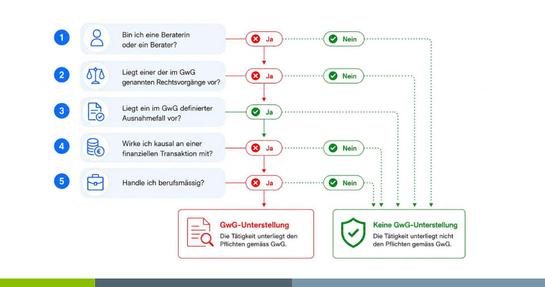

GwG Revision 2026: What Law Firms and Fiduciaries Need to Know Now