
Different types of payment synchronization extensions in Vertec
 Cloud Suite
 On-Premises
Payment synchronization occurs via the accounting extension. The payment synchronization extension reads information about the payment status of debtor invoices from the accounting application and modifies the corresponding data in Vertec.
If you have an accounting extension installed, you can initiate payment synchronization from the menu via Settings > Payment synchronization.
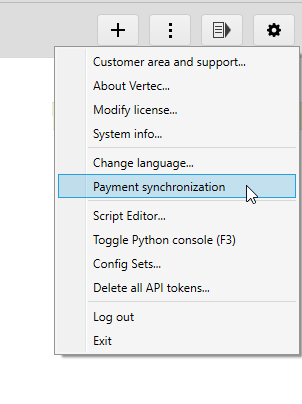
Vertec considers all invoices that have been posted, but have not yet been paid in full (Paid checkbox). For each of these invoices, the accounting application checks whether there is a payment based on the invoice number. For each of these payments, a corresponding payment is then entered in Vertec on the invoice.
You can also access payment synchronization on individual invoices via the menu button Actions > Payment synchronization or via the right mouse button. In this case, only the payments for this invoice are imported from the accounting application.
Payment synchronization is client-capable. This means that the client is taken into account on the individual project.
Available in the following extensions:
To automate payment synchronization, Vertec can be started with the /PAYSYNC parameter.