Efficient case management for your law firm – digital files, deadlines & DMS benefits
What does case management mean?
Case management refers to the systematic organisation, management and control of documents and information within a law firm. This includes not only classic paper files, but increasingly also digital documents such as emails, contracts, reports or scans.
The goal is to structure information in the form of digital files in such a way that it can be found, is trackable and legally secure at any time.
Proper legal case management leads a document throughout its entire lifecycle in your law firm – from creation or receipt, through processing and filing, to data protection-compliant archiving or deletion. As soon as a document is created or received, it is entered and integrated into a filing system using metadata such as date, case number, or responsibility. In digital law firms, this is usually achieved by a document management system (DMS) such as iManage.
An important aspect of case and file management is also the clear regulation of access rights. Not everyone is allowed to view or edit every piece of information. At the same time, it must be ensured that authorized employees can find documents quickly and reliably. A good document structure saves time, reduces errors and improves collaboration.
Moreover, compliance with legal requirements plays a key role. Many documents are subject to certain retention periods. Structured file management helps ensure that these deadlines are be met and documents are saved in an audit-proof manner.
File and case management as a driving force
The importance of record management in law firms is comparable to the drive train of a car. Without the drive train, all the other components become irrelevant. The same is true of record management and all its components: opening mandates, time tracking, document management and invoicing are just a few of the steps involved in each legal case.
A law firm is paid for the legal support and consulting of its clients. And yet – without stringent file management, it is impossible to work efficiently.
What are the benefits for law firms with digital file and case management?
- Keep track of deadlines with proper file management
- Increased ease of use and enhanced productivity with digital file management
- Document management in a law firm: overview & structure in digital files
- Case management in order
- Secure case management in the cloud
Keep track of deadlines with proper file management
Meeting deadlines and managing appointments are firm pillars in the work of a lawyer. The legal risks of missed deadlines can jeopardize not only litigation, but also the reputation of the entire law firm.

Everyday work is often hectic, especially in law firms. All the better, if the law firm management system keeps you updated on upcoming deadlines via notifications. Plus, filterable overviews provide exactly the overview you need in your day-to-day work at the law firm.
- View deadlines by user
- View all cases deadlines
- View deadlines in calendar view
- Deadlines for verification
- Open deadlines



Increased ease of use and enhanced productivity with digital file management
With more than 35'000 users in the DACH region, we at Vertec know what matters to our customers. The details may differ from industry to industry, but the following principles basically apply everywhere.
Lawyer software should be comfortable to use, fast and run stable. Logic automations and integrations take away manual work. A prominent example in law firms is the integration of Vertec and Outlook. With the Vertec Outlook App, our customers use Vertec directly in the Outlook user interface. Without having to switch inbetween software, you can:
- Enter new addresses directly from Outlook in Vertec
- Save emails as activities in Vertec
- Access addresses in Vertec when writing emails
- Enter hours worked directly in Vertec, right from calendar entries
Perhaps the greatest benefit is the overview of the activity feed, directly in Outlook. This allows you to view not only your own activities in a file, but also all other activities that have been entered by colleagues.

Document management in a law firm: overview & structure in digital files
Work on a case consists of different steps as explained below.
- Openin a case with various process steps such as the conflict check
- Find and edit files
- Save and search of documents
- Dispatch of invoices
- and much more
Does your legal case management still look exactly the same as it did 10 years ago? Many of our customers are constantly improving their work processes. How practical it is if your practice management software not only somehow tolerates these changes, but can easily adapt and facilitate?
”What matters to us is reliability, that the system really runs reliably and that it provides the features we need.”

How exactly is this lightweight customization possible? Vertec offers various core features, with which a large part of the processes can already be mapped. Use of free additional features, industry-standard requirements such as deadline monitoring, conflict check or invoice splitting can be implemented in a lightweight manner. These features can be used immediately out of the box. But further adaptability is also possible, just like it is with the core features.
Functionality which is not yet covered by either basic or additional features can be achieved through individual customization. Some law firms enhance Vertec on their own using our free Knowledge Base, others rely on the Vertec project management team.
Case management in order
Ease of use and adaptability are two important factors that modern law firms can expect from their practice management software. Another aspect to consider for sustainable acceptance across all teams is: How tidy is the system? And how accurately is data managed?
We at Vertec have learned from various implementation projects that different stakeholders in law firms have very different requirements towards order and clarity. While assistants spend a lot of time on file and document management, partners need all the relevant KPIs at a glance to manage the law firm commercially successful.

Since all important processes are mapped in one software environment, Vertec eliminates media disruptions that you might know from fragmented system landscapes. Digital case and file management, invoicing, controlling – everything is based on a central database.
«With Vertec, we have found an overall solution that the market has not been able to offer us in this form. Our individual requirements are covered so well that we were able to replace two existing software systems with Vertec.»
Secure case management in the cloud
Modern case management offers convenience, efficiency and can scale with the law firm in an agile manner. However, all these advantages must not be at the expense of security. This is why it is essential that file management happens right in the practice management software. Every step of work that is outsourced to other systems opens up new security risks.
Take advantage of the security mechanisms that Vertec provides: ISO 27001 certified cloud operation, two-factor authentication, granular user rights and much more. How Vertec makes sure data security in the cloud is kept at a very high level is explained in our blog article Security in the Vertec Cloud Suite – a look behind the scenes.
Conclusion
Modern case and file management turns a law firm into a well-oiled machine in which the different parts fit together perfectly. Optimally coordinated processes result in a high overall quality and at the end of the day in tangible profitability gains. On our industry page you can find more insights into Vertec’s Law Firm Management System.
FAQs
“Business-oriented law firm management” means that in addition to file management, deadlines and invoices, Vertec also provides you with all the important data for the economic management of your law firm. This is completed by our “best-of-breed” understanding of software and our practice-based industry expertise for the rapid development of individual functions. The concept is based on easily customizable functions, which yet cover 80 % of the industry's standard requirements.
With only little effort, your specific requirements can be implemented in your software solution quickly and easily. Vertec stands for industry expertise, developed together with our customers in Germany and Switzerland.
Individual solutions for creating and updating rubrum have already been implemented.
Rubrum contains the most important information about the client and the content of the case. Rubrum later also includes the mandate interests and can be overwritten. In addition to the code, the representation also contains the client and the field “In matters”.
Yes, Vertec is a law firm software that is specifically designed to run your law firm economically successful. Vertec is particularly suitable for modern law firms from 20 employees.
Vertec is available in On-Premises operation or runs in the Cloud Suite.
The scope of features ranges from collision checking to mandate management and deadline monitoring to individual invoicing processes, debt management and profit distribution.
In short, all typical processes that occur in a law firm on a daily basis are mapped.
As the ideal foundation for successful law firm management, Vertec helps you increase your productivity by providing you with just the tool you need to efficiently organize your law firm, digitize workflows and ultimately ensure smooth case and mandate management.
Vertec adapts to your processes – not the other way around.
A software for law firms is a specialized software for lawyers that optimizes the everyday work of the legal professionals. For example, it continuously maps processes and thus creates transparency in your daily business. It focuses primarily on mandate-related and billing-relevant tasks.
Typical features include:
- File and Mandate Management
- Collision checks
- KYC
- Time tracking and recording
- Deadline monitoring
- Fee billing (e.g. via RVG in Germany)
- Debt management
- Document management
- Invoicing and controlling
Law firm management, on the other hand, describes the holistic organization and management of a law firm – in terms of legal, business administration and staff. A modern law firm software is part of efficient law firm management and contributes to smooth work.
The areas of law firm management also include:
- Organization of workflows and processes within the law firm
- Planning of staff on cases and mandates
- Controlling and analyzing relevant KPIs (such as turnover/billables, capacity utilization, profitability)
- Client retention
- Strategy and law firm business development
Law firm management is therefore to be considered in a more comprehensive way and goes beyond the purely legal features of a law firm software. Law firm management is the strategic and organizational approach that sees the law firm as a business enterprise that needs to be run economically successfully on the long term. Law firm software, however, is much more the operative tool for your daily work.
All your cases, mandates and deadlines under control.
Vertec as your law firm software provides you with a clear and efficient mandate and case management.
Meeting deadlines and clear processes are paramount in your day-to-day work at your law firm. This is where mandate and case management with Vertec comes into play.
In this video, you will see how you can centrally manage checklists, deadlines, recorded time and services directly on mandate level – from financial accounting to VAT over salaries and auditing.
Short. Clear. Practical.
Vertec & iManage: seamless integration of project and document management
Vertec’s iManage DMS extension connects your Vertec project management directly to the powerful iManage document management system. In this video, we show you how smoothly the DMS works with Vertec – for a structured, secure and efficient document management.


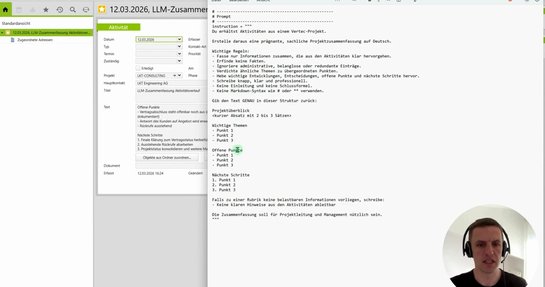

AI in Vertec: the new LLM Client in Python 3


Modern mandate management: a clear overview for higher productivity in your law firm
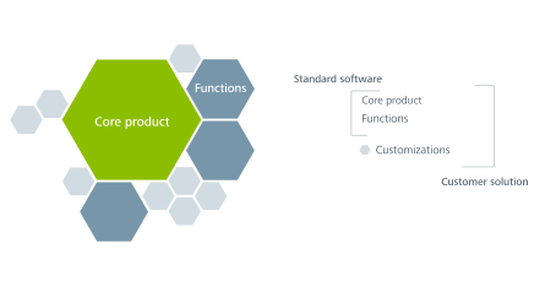

Update capability and adaptability in Vertec: a technical area of tension


30 years as a software entrepreneur


How to switch to the Cloud Suite

The ideal solution for Law Firms: Vertec and iManage in perfect harmony

New in Vertec: Sealing accounting documents