
Exact Online Debtors Extension
 Cloud Suite
 On-Premises
In Vertec, open Interfaces > Extensions in the folder Settings. Open the Exact Online Debtors Extension and click Install.
Log in to your Exact Online.
Navigate to Manage my apps and click Register app.
/callback, e.g. https://mycompany.vertec-cloud.com/callbackSome system settings are installed for all debtors extensions. These are listed in System settings > Accounting.
Specific system settings for the Exact Online Debtors Extension are:
Exact Application IDAs of Vertec 6.8.0.26. Insert the Client ID of your registration of the Vertec app in Exact Online here. PropertyName: |
Exact Application SecretAs of Vertec 6.8.0.26. Insert the Client secret of your registration of the Vertec app in Exact Online here. PropertyName: |
Exact Base URLAs of Vertec 6.8.0.26. Enter the URL to your Exact Online here. For Germany PropertyName: |
Exact Delete linked documents (cancellation)As of Vertec 6.8.0.26.
See section Cancellation. PropertyName: |
Exact Upload documentAs of Vertec 6.8.0.26. Saves the Document deposited directly on the invoice to Exact. For Cancel, the cancellation document must be present before the cancellation takes place in order for the cancellation log to be sent. If this system setting is set to Yes, but no document is available when posting, Exact creates an empty document object that is linked to the posting. If necessary, a document can be uploaded manually afterwards. PropertyName: |
FAR connectionEnter the ID (the numeric value) of your FAR client in Exact Online here. PropertyName: |
Cancellation methodThere are 2 cancellation methods:
See Cancel for a detailed description. PropertyName: |
standardcountry will be checked for a two-digit entry, otherwise an error message will appear. Make sure that the country on your addresses is filled with the correct code.Vertec requires the following user rights to work with the Vertec Exact Online Extension. It is best to set up your own User Group and assign the appropriate users.
| Class | Field | User right |
|---|---|---|
| address | keys | Read & write |
| personalAccount | Read & write | |
| invoice | keys | Read & write |
| personalAccount | Read & write | |
| postingNum | Read & write |
When a user logs in to Exact Online for the first time via Vertec, a login page appears where they can log in with their user.
The question appears whether the app should be accepted access. If the answer is yes, and the user has sufficient rights to the FAR client, the login is done via OAuth.
If you want to work with foreign currencies and exchange rates, you have to select Variable: Currency and Variable: Exchange rate in the posting journals in Exact.
The collective account is also defined on the posting journal in Exact.
How debtors are written is explained in detail in the article Posting debtors with Vertec.
With Exact Online, these special features apply:
ExactGUID.
The addresses in Exact are populated with the following values from Vertec:
| Exact | Vertec |
|---|---|
Name |
|
SearchCode |
Internal id of the address. |
IsSales |
For debtors True. Indicate whether it is a debtor address or not. |
IsSupplier |
For creditors True. Indicate whether it is a creditor address or not. |
|
|
standardemail of the address. |
Phone |
standardtelefon of the address. |
Website |
standardhomepage of the address. |
AdressLine1 – AdressLine3 |
If the standardaddress has more than one row, it will be split into individual rows. |
Postalcode |
standardzipcode of the address. |
City |
standardcity of the address |
Country |
standardcountry of the address. Must be 2-digit ISO code, see Prerequisites. |
Remarks |
remarks of the address. |
Language |
language of the address. |
Status |
c, denotes a customer. |
VATNumber |
vatid of the address. |
PaymentConditionSales |
paymentterms of the address (inherited from the system settings), see Prerequisites. |
Each FAR client in Exact has its own root data. The address master data applies to debtor and creditor addresses. Whether it is a debtor or a creditor is distinguished by a flag in Exact.
If the same Vertec address is used as Exact accounts receivable and accounts payable, the same PK PersonalAcc is entered in Vertec in the personal account debtors and personal accounts payable fields.
The same address cannot be posted or created in several Exact divisions at the same time, since the personal account in Vertec is unique and only one GUID of Exakt is written in Vertec (see above).
If there are invoices / creditors from different Exact divisions in a list posting, a message is shown:
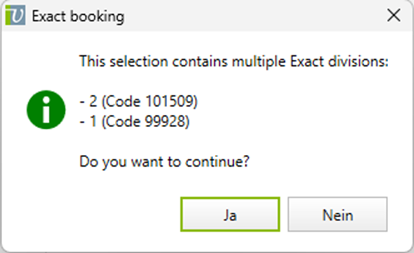
There are 2 Cancellation Methods:
In order for the payment to be found at Payment import with vertec, it must be ensured that it is linked to the corresponding posting in Exact.
The payment is always created in Vertec based on the currency on the invoice. If, for example, a USD payment is entered on a EUR invoice in Exact, the payment import converts the amount to EUR and writes this value in Vertec to the payment. Thus, small rounding differences may occur if several partial payments are entered.