
Working with SQL queries
 Cloud Suite
 On-Premises
SQL queries are recommended whenever data is to be loaded into Vertec in a filtered (pre-selected) manner. While all objects are loaded into memory via OCL and only then are filtered, SQL is filtered on the database and only the resulting objects are loaded into memory.
See the article Performance-optimized access to vertec objects.
SQL queries can be placed in Vertec in several locations:
Except for SQL folders, all SQL queries require either Administrator or SQL query right.
In Vertec SQL queries only specify which objects you want to put in a list and the filter criterion. The rest is completed by the object system. Thus, statements of the type “SELECT * FROM Project WHERE” are never made, but only a class (for the SELECT statement) and the filter criteria (for the WHERE clause).
In the lower part of the article you will find further information on
In Sql folders by specifying a class and an SQL criterion:
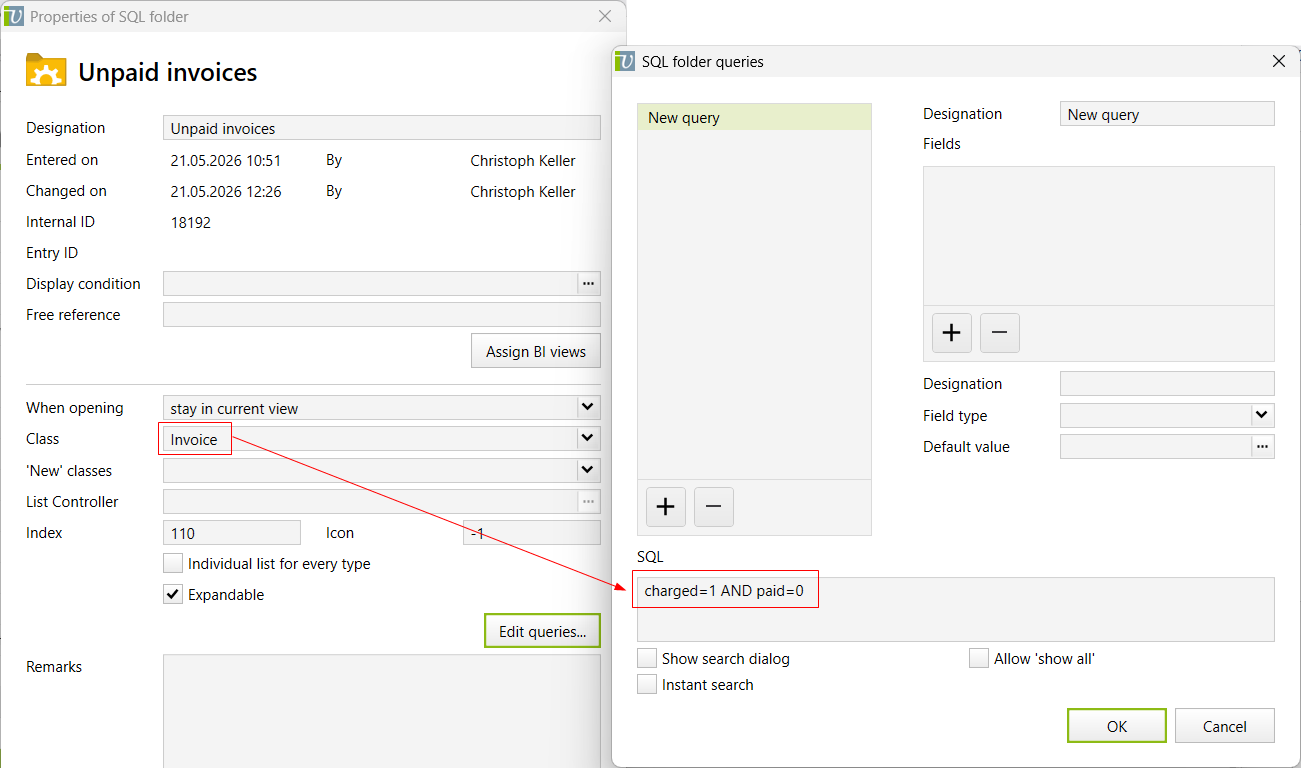
Invoicecharged=1 AND paid=0From this, Vertec then creates the actual SQL expression in the background and deposits it in the database.
This means: If you want, for example, call an SQL query SELECT * FROM Invoice WHERE charged=1 AND paid=0, create a SQL folder with the class Invoice and the SQL charged=1 AND paid=0.
Any sorting is then carried out in the List Settings.
There are several Vertec Python Functions to query data via SQL. The most important one is vtcapp.getwithsql(). The syntax here is:
vtcapp.getwithsql(class: string, where: string, order: string, [fieldname: string, objectlist: list])
Again, you can see that the actual SQL query is composed of the different parameters. So it is not just a SQL statement, but the individual criteria are composed as follows:
For example, a full call looks like this:
invoices = vtcapp.getwithsql('Invoice', 'charged=1 AND paid=0', 'entrydate')
Vertec then creates the actual SQL query and stores it on the database.
This means: If you want, for example, call an SQL query SELECT * FROM Invoice WHERE charged=1 AND paid=0 ORDER BY entrydate, enter vtcapp.getwithsql('Invoice', 'charged=1 AND paid=0', 'entrydate') in Vertec Python.
Or, for example, if you only want to load the paid invoices of your own projects, with optional filter criterion:
ownProjects = argobject.evalocl("ownprojects")
invoices = vtcapp.getwithsql('Invoice', 'charged=1 AND paid=0', 'entrydate', 'project', ownProjects)
This means: For the SQL query SELECT * FROM Invoice WHERE charged=1 AND paid=0 AND project IN (SELECT BOLD_ID FROM Project WHERE projectmanager=12345) ORDER BY entrydate, enter vtcapp.getwithsql('Invoice', 'charged=1 AND paid=0', 'entrydate', 'project', argobject.evalocl('ownprojects')) in Vertec Python.
SQL can also be used in requests to the Vertec REST API.
The requests are dropped directly on the class. Using the query parameter sql the filter criterion is then passed:
<ServerURL>/api/webservice/REST/objects/Invoice?sql=charged=1 AND paid=0
This means: If you want, for example, call an SQL query SELECT * FROM Invoice WHERE charged=1 AND paid=0, request /objects/Invoice?sql=charged=1 AND paid=0 to the REST API.
Any sorting can be entered directly into the WHERE clause: /objects/Invoice?sql=charged=1 AND paid=0 order by entrydate.
The Vertec XML Interface also enables SQL queries.
Therefore, the <Selection> element can contain the following sub-elements:
<ocl>: Name of the class of objects to load. <sqlwhere>: Here the filter criterion is specified, which is applied to the class specified by <ocl>.<sqlorder>: Optionally, the output can be sorted by the here given attribute.This means: If you want, for example, call an SQL query SELECT * FROM Invoice WHERE charged=1 AND paid=0 ORDER BY entrydate, the corresponding XML request would be:
<Selection>
    <ocl>Invoice</ocl>
    <sqlwhere>charged=1 AND paid=0</sqlwhere>
    <sqlorder>entrydate</sqlorder>
</Selection> Since Vertec 6.8, the database is created in English, the model language in Vertec can be German or English. What does this mean for SQL queries?
Since the queries are always compiled by Vertec, and direct SQL statements to the database are never made, the good news is that it doesn't matter whether the class and member names are given in German or English. Vertec has an internal translation system and the information can even be mixed:
vtcapp.getwithsql("Invoice", "charged=1 AND bezahlt=0", "")
You don’t have to worry about the data model either. You can specifiy Service as a class even though there is no table of this name, only the tables OpenService and ChargedService. Vertec does this automatically correct and outputs both open and charged services as a result.
Of course, you need to know the correct members for the filter criterion. These can be found in the Vertec Model Browser or in the OCL Expression Editor. It applies:
Important is to know that you cannot query calculated data fields (derived attributes) because they are computed at run time and are therefore not stored in the database.
On the other hand, the data model plays a role in subqueries, within the WHERE clause.
Here is an example of a subquery for all projects with unpaid invoices:
vtcapp.getwithsql("Project", "bold_id in (select project from Invoice where charged=0)", "")
When selecting another class (table) within the criterion - in the example from Invoice - only tables that actually exist in the database can be queried. At this point, for example, a query on Service would caus an error because there is no such table.
The information about whether there is a table for this class can be found directly in the database or in the Vertec Model Browser, where you can see the mapping on each class:
OWN means that there is a table for this class.
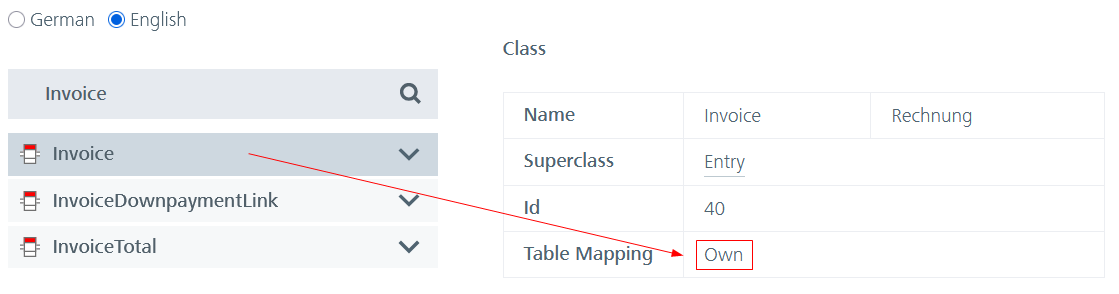
Example: There is a table Invoice, which can be queried by the subquery:
vtcapp.getwithsql("Project", "bold_id in (select project from Invoice where charged=0)", "")
CHILDREN means that there is no table for this class, but that it is divided into tables of the subclasses.
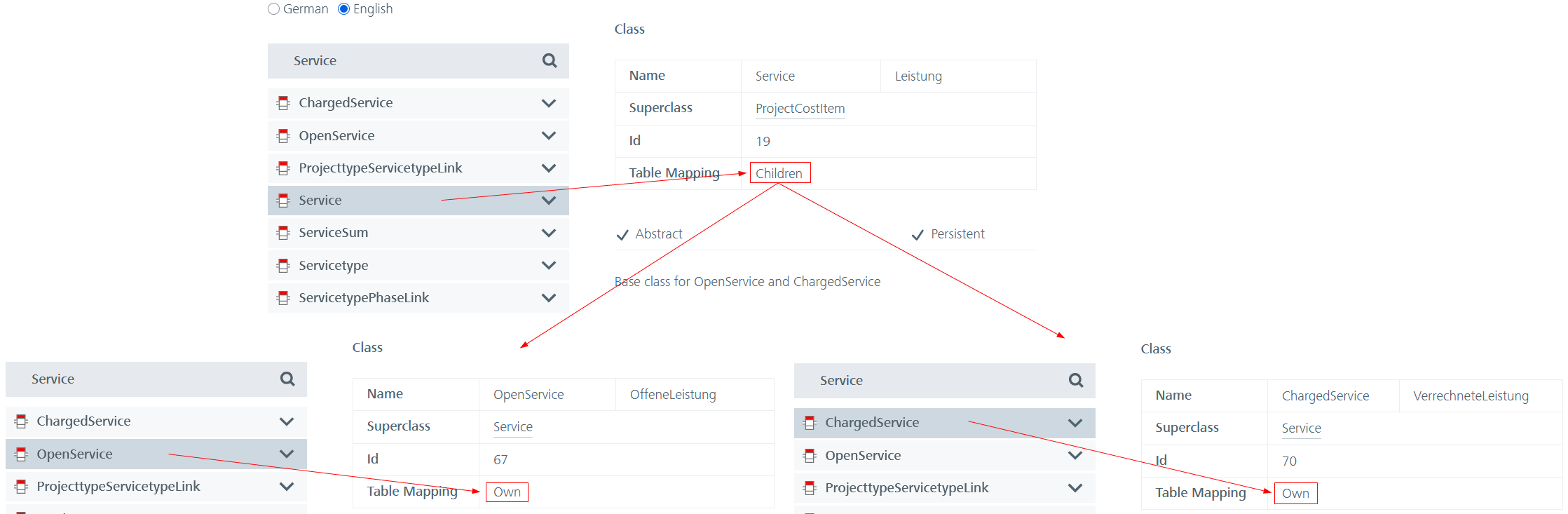
For example, there is no table Service that can be queried in the subquery. Instead, OpenService and/or ChargedService must be queried.
vtcapp.getwithsql("User", "bold_id in (select user from OpenService)", "")
If you want to query both tables, you can select several selections with UNION are related:
vtcapp.getwithsql("User", "bold_id in (select user from OpenService union select user from ChargedService)", "")
PARENT means that there is no table for this class, but it is subsumed in a parent table. You can then navigate directly to the superclass until you reach the mapping OWN.

For example, there is no table Account that can be queried in the subquery. Instead, the table Address must be queried.
vtcapp.getwithsql("User", "bold_id in (select accountmanager from Address)", "")
However, if you only want to consider the subclass here, you can filter by bold_type. This corresponds to the Id in the Model Browser. In the example shown above, for accounts it is the id 84.
vtcapp.getwithsql("User", "bold_id in (select accountmanager from Address where bold_type=84)", "")
The names of the tables always correspond to the class names in the model, with one exception:
There is no table named User, because this is a reserved word in SQL and cannot be used as a table name. Therefore, the table for the User class is named VtcUser. Also for members named user, the columns in the database are vtcuser.
However, for the SQL queries including subqueries from Vertec, it does not matter whether the class and member names are given in German or English. Vertec automatically translates this correctly.
vtcapp.getwithsql("Project", "projectmanager IN (select bold_id from User where name like '%keller')", "")
In Vertec versions up to 6.8.0.17, however, this had to be taken care of. In earlier versions, if you access the user in an English subquery, the table name had to be VtcUser to be specified (projectmanager IN (select bold_id from VtcUser where...). Projektbearbeiter worked and works in both languages.