
BI KPIs for consultants
Using this feature, you can easily display KPIs relevant to consulting firms
How this feature creates benefits
The KYC feature in your Vertec software for lawyers helps you to automatically audit affiliated companies and individuals when opening a mandate, saving you time while ensuring compliance requirements are easily met. The feature provides a structured basis that can be flexibly adapted to your internal audit processes.
It allows for transparent documentation and traceability of audits – it is immediately clear who has completed a task. The history of audits is also recorded in a traceable manner via entries such as “audit completed on”. This allows you to manage risks more specifically and minimize sources of error in the mandate audit.
How it works
With the additional feature “BI KPIs for consultants” a structured evaluation environment is set up in Vertec within the "Controlling & BI" area. This creates a separate folder called BI KPIs for consultants”, which contains various predefined evaluations. These provide key figures measuring team performance, customer projects and budget comparisons.
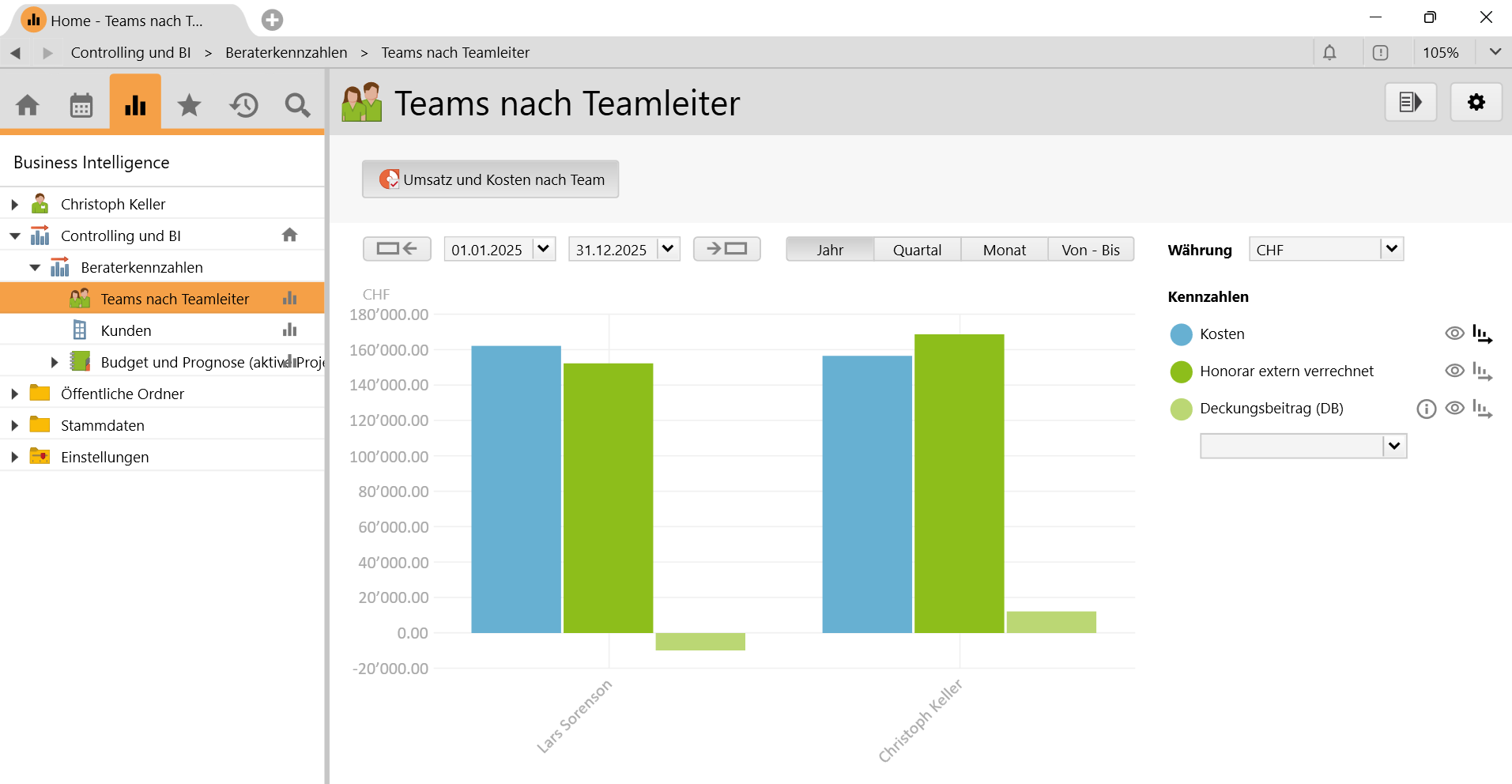
For example, one analysis shows how much fees individual teams under the leadership of their team leaders earned and what internal costs were incurred. Other analyses show the profitability of individual customers or projects – for example, by comparing services, expenses, and margins achieved. Another analysis compares the budget and actual values of active projects. It shows whether planned fees and hours worked are met or whether there are deviations. If the Vertec module "Resource Planning" is also used, forecast data is also included in this evaluation.
What will be set up?
Within the root folder "Controlling & BI" the subfolder "BI KPIs for consultants" will be created. There are several subfolders for different evaluations:
- Teams by team leader – shows internal costs, fees charged and contributions margins grouped by teams
- Customer – shows key measures on services, expenses, costs and contribution margin per customer/project
- Budget and forecast (active projects) – allows you to compare plan versus actual values and shows forecasts from Resource Planning.
What do the evaluations show?
- Internal cost and fee profile of teams and individual employees
- Contribution margin as difference between realized fees and worked hours
- Budget-versus-actual variances for fees, outlays and hours
- Forecast values, based on Resource Planning (if licensed).
The module "Controlling & BI" is required to use this feature. Access to the consultant KPIs is regulated by user groups and can be specifically approved. In this way, the insight into key measures remains controllable and controlled.
Knowledge Base Articles
Related features
Core measures and own measures, BI measures for opportunities, Automatic Receipt Recognition
Frequently asked questions
What CRM features does Vertec offer?
Vertec brings all the features for a structured management of a customer database. However, the business software for service providers can manage much more than contact details and customer addresses: Maintain customer relationships and appointments, create offers that are closely linked to your project planning and use sales pipelines to increase your sales. With full text search, content stored in Vertec, including emails, can be searched by any authorized person. A complete overview is available on the feature page.
How do I write an offer?
You create a new offer in Vertec on an existing project or a case. Firstly, you select the service types or project phases and assign them to the offer. Budgeting is done in the next step. A clear advantage: Project planning and creating of offers is directly connected, which saves you a lot of time throughout the process. Further information on creating an offer is provided on the relevant page.
Is a sales pipeline included in Vertec?
Yes, in Vertec you can use the feature opportunities on contact/company or project/project phase level to create and evaluate sales phases with amount, probability and date.
What ERP features does Vertec offer?
From service and expense recording to post-calculation, costing and controlling: With Vertec you are optimally positioned as a project- or mandate-oriented service company. With the Business Intelligence module, you can even visualize data directly in the Vertec interface.
A complete overview can be found in the overview of features.
Can I save my travel expenses, such as hotel bills or taxi receipts, directly in the system with a photo of the receipt?
The Phone App allows you to take a picture of posts directly with your smartphone and then add them to expenses. The Web App and the Cloud App allow you to upload and add files. Automatic receipt recognition significantly simplifies the process by eliminating the need for manual work.
How do I keep track of critical deadlines?
In day-to-day business, the efficient management of follow-ups and appointments is essential. Outlook tasks, calendar entries or project management tools are only recommended to a minimum. Task and follow-ups are not visible to all users. The complete history of a project or case is also not visible.
With Vertec, you can work much more globally. You can quickly and easily capture, enter and track your activities, follow-ups and appointments. You can also see at a glance whether an assigned task has already been completed.
When you log in to Vertec, you can be alerted to appointments or deadlines via a pop-up. In addition to your own appointments, team leaders can also search and view the open tasks of their own team. For certain events, an automatic email can be sent to the responsible users. This way, everyone keeps an overview.
How can I test Vertec without obligation?
You may test Vertec for 30 days free of charge and without obligation in your personal test environment.
Start your free trial now.
What features does the Vertec Phone App offer?
With the Vertec Phone App, you can complete the following:
- Enter services
- Enter expenses with automatic receipt recognition
- Enter absences
- Show a company’s activities, opportunities, projects and contacts
- Upload documents
- Open documents (Word and PDF) saved in Vertec


