
Deadline calculator
Calculating deadlines made easy – for Switzerland and Germany.
Operating mode
 Cloud Suite
 On-Premises
Modules
CRM
In order that you do not have to keep track of weekends, holidays and legal regulations for deadlines, the deadline calculator has been created specifically for this part. With this additional feature, you can calculate the due date of a deadline. Due to the legal deadlines and local holidays, a German and a Swiss version were created. The function is the same in both and differ in the public holidays of the cantonal states (CH) and federal states (DE) as well as country-specific legal regulations, such as supension of limitations periods (CH) and declaration of intent/an act of performance (DE).
This application is an additional feature. You can find the corresponding config sets here.
Note: It is possible to use both versions at the same time. However, if one of them is deleted, the other version cannot be used. So if you delete a config set, both version must be deleted and install the appropriate one for the reuse. If you import both, we recommend that you change the designations of the scripts to be able to distinguish them clearly in the user interface (see register scripts). Example: Calculate deadline_CH and Calculate deadline_DE. This is useful if the company works in these countries.
Application
Manage settings deadline calculator
Prerequisite: To edit and access the folder settings deadline calculator, the user must be assigned to the administrators user group.
After importing the respective additional feature, the subfolder settings deadline calculator is created in settings > projects. In this subfolder, all public holidays of the cantonal states or federal states of the selected country are automatically imported and shown after the first import of the config set. In the case that some public holidays are deleted necessarily, they can be reloaded again by using the function. Public Holidays from Switzerland, Germany and Austria are available. You can create your own holidays by clicking on New in the menu.
- Run the function
Import public holidaysby right-clicking on the subfolder settings deadline calculator or click on it under the actions menu. - Select the country from which you want to import holidays and confirm with
OK. - You will receive a notification when the new holidays have been imported.
- If necessary, narrow the search for public holidays by country, state or year.

Note: The holidays are from the same source that is used for the additional feature import holidays.
Calculate a deadline
Note: Vertec assumes no liability for the calculated deadlines.
To calculate a deadline, you must first create an activity.
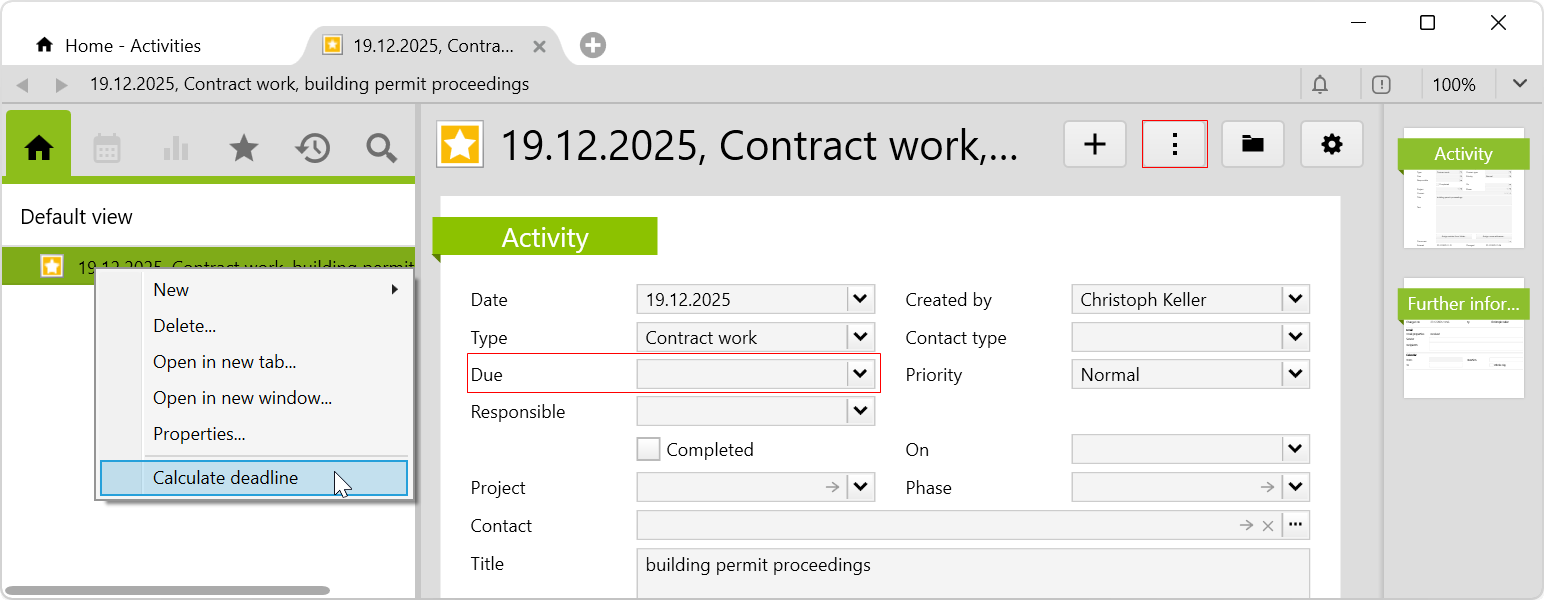
Then select Calculate deadline by right-clicking on the activity or by using the actions menu.
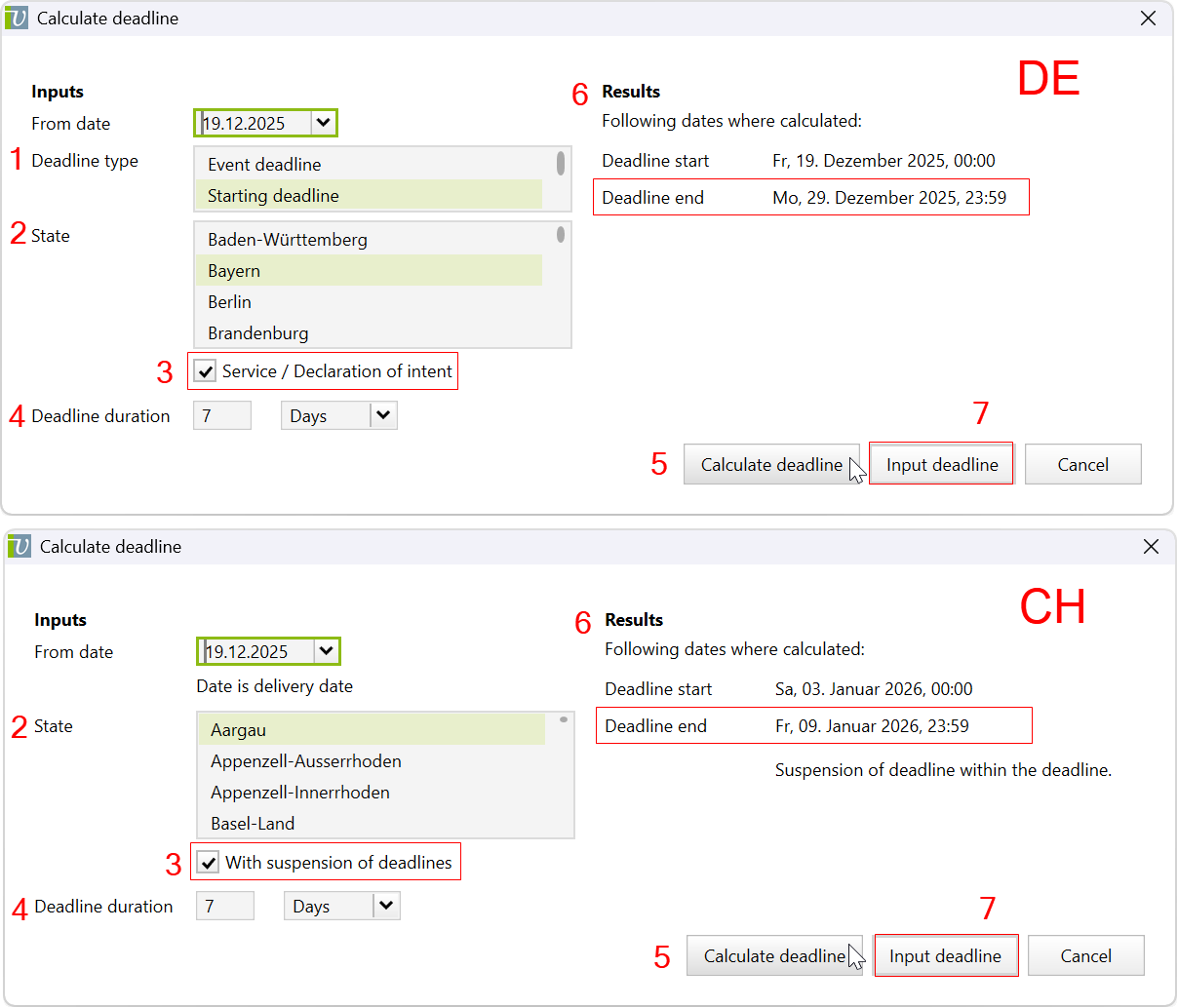
Interface for versions DE/CH
An interface appears with the following input values to select:
| No. | Input values | Description |
|---|---|---|
| 1 |
Deadline type (only for DE) |
You can choose between the event deadline and the starting deadline.
|
| 2 |
State |
Here, you can select the cantonal state or federal state in which the public holidays apply and which are relevant to you. |
| 3 |
Checkbox |
|
| 4 |
Deadline duration |
Here you can choose between days, weeks, months and years. Note: When calculating with months, the Federal Court Decision (BGE 5A_691/2023, E. 5.6) should be taken into account. |
| 5 |
Calculate deadline |
After all the corresponding inputs have been entered, the deadline can be calculated. |
| 6 |
Results |
The start of the deadline and the calculated end of the deadline are shown under results. |
| 7 |
Input deadline |
If the results are convenient for you, the due date can be entered and the interface closes. Note: The inputs can also be changed after a single ridge calculation. Then click on calculate deadline again and the adjusted results will be shown. |
Download
Before importing the config set, we recommend you read the article Key information about the additional features. Config sets modify data in Vertec, which can overwrite existing data.
The exact import process is described in config sets.
You can download the additional feature with the following link:
| Version Requirement | Download |
|---|---|
| 6.8.0.1 | ConfigSet_DeadlineCalculatorDe.xml |
| 6.8.0.1 | ConfigSet_DeadlineCalculatorCh.xml |