
Python 3 support
How to work with Python 3 in Vertec
Operating mode
 Cloud Suite
 On-Premises
Modules
All
As of Vertec 6.8.0.17, Vertec can also process Python 3 code alongside with the existing Python 2 code.
Alongside means that both Python 2 and Python 3 scripts can be executed in the same Vertec. The entire existing codebase remains executable unchanged. However, new codes can (and should) be written in Python 3. How this works is explained below.
Scripts
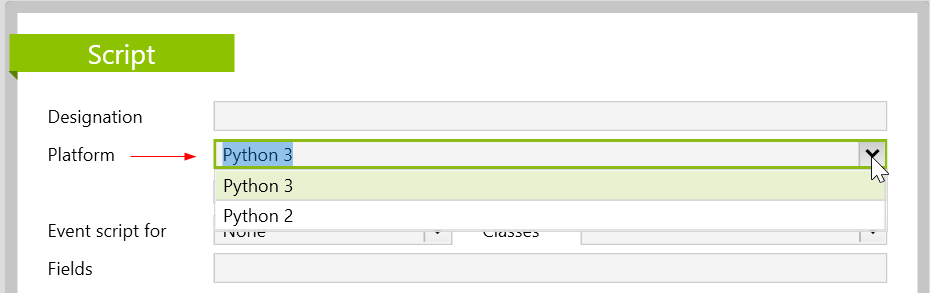
When registering Scripts in vertec, it is now possible to select under Platform whether it is a script in Python 2 or in Python 3:
Calling code in other scripts (modules)
When module code from Scripts as modules, it must be noted that the entry point defines the Python version, so the code being called must be compatible with the calling code. In these cases, the platform is ignored for the modules being called.
OCL Call Operators
For OCL call operators, where Python code is called from OCL, the Python version depends on the version platform of the called module script.
List controller / Custom renderer
For List Controllers and Custom Renderers, custom renderers Python version also depends on the version of the registration. It is important to note here that custom renderers that call values from list controllers work with the same Python version.
Python code outside of scripts
Code that does not reside in a script entry (e.g. in Python code for office reports or in function features such as vtcapp.scriptexecute()) is interpreted as Python 2 code for backward compatibility. If you want to write and execute such code in Python 3, you can use the markup in the first line python3 as a comment. In this case, the code is interpreted as Python 3 code.
# python3
# hier kommt dann der Python 3 Code
Script Editor
In the Script Editor you can switch between Python 2 and Python 3. To do so, go to the menu at the top right under settings and click on Script Editor....
This opens the script editor that is not linked to a script entry. In a script editor of a script entry, this button does not appear.

The entered code is then executed accordingly, and the console on the right also interprets the code in the set Python version.
Python Console (F3)
The Python Console, which is displayed and hidden via the function key F3 (or via the Settings menusetting below the current page, always interprets the input as Python 3 code from Vertec 6.8.0.17. This means that as for this version only Python 3 code can be used.
Restricted Scripting
Which Python modules in Restricted Scripting on the Whitelist are for Python 2 and/or Python 3 and can be imported into scripts can be found in the article Restrict scripting for cloud sessions.