
Working with the Vertec MCP Server
 Cloud Suite
 On-Premises
As of version 6.8.0.21, Vertec offers the Vertec MCP Server.
MCP (Model Context Protocol) is an open standard for connecting AI applications to external systems. With the Vertec MCP Server, AI clients such as Claude or ChatGPT can connect to Vertec and both query structured data and perform tasks in Vertec such as creating new objects.
The Vertec MCP Server runs together with every Vertec instance in the Vertec Cloud Server. The MCP itself is an intermediate layer that publishes tools (and the texts) against external tools, receives requests, and forwards them internally to the Vertec web services. It does not do anything that could not be done via the REST API, nor is it faster in processing data. It is not suitable for processing large lists of objects, and if you want to analyze measures with it, licensing the Business Intelligence module is strongly recommended. The difference is that it allows you to connect structured Vertec data (including customizing classes, custom field items and link types) to an AI system and analyze it using AI.
The Vertec MCP Server has knowledge of the Vertec Model, which makes it possible to query structured data in Vertec. This means that queries are based on the model, and not based on text content as in an LLM / RAG system. The graph below shows the interaction of the different components:
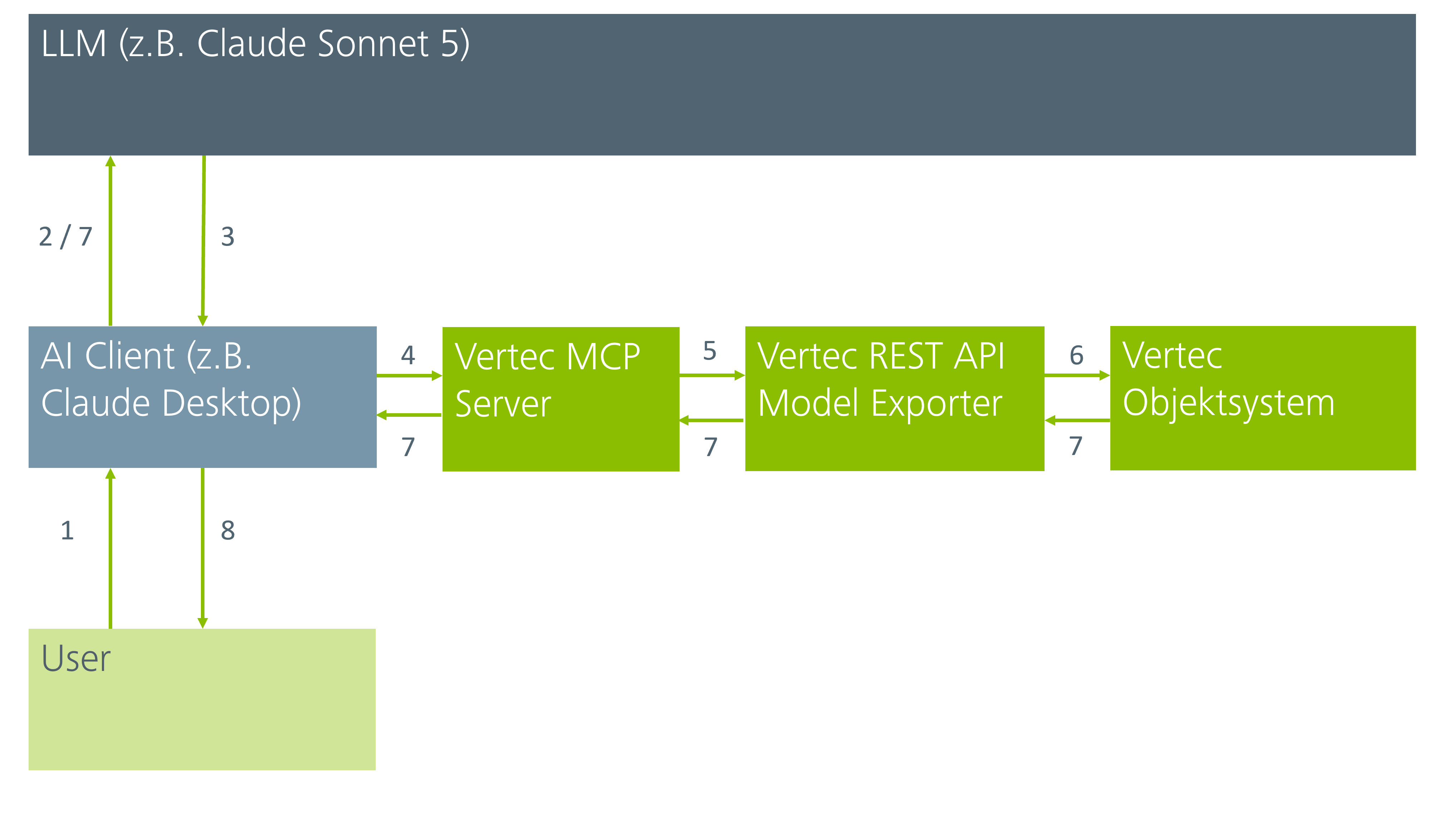
The tools available in the Vertec MCP Server are connected via so-called MCP connectors. See the section Connect to vertec.
The Vertec MCP Server is part of the Vertec Cloud Servers and basically runs when the Cloud Server is running, but it is not really started until the first access is made to save resources when not in use. When running Vertec On-Premises, the MCP Server can also be turned off completely in the Vertec.ini – file.
The Vertec MCP Server’s knowledge of the Vertec Model is controlled by the Vertec web service called ModelMetadata. This must be aktiv in order to work with the Vertec MCP Server. The requests to the data are made internally by the Vertec MCP Server via the Vertec rest api. Therefore the REST web service must be aktiv.
Authentication of the Vertec MCP Server to Vertec is done via OAuth2, the Vertec Cloud Server acts as an OAuth server. For this purpose, the following parameters are available in the system settings Authentication:
code_challenge parameter in the authorize request).HTTPS addresses, otherwise a warning will be issued when connecting.
https://claude.ai/api/mcp/auth_callback.https://vertexaisearch.cloud.google.com/oauth-redirect.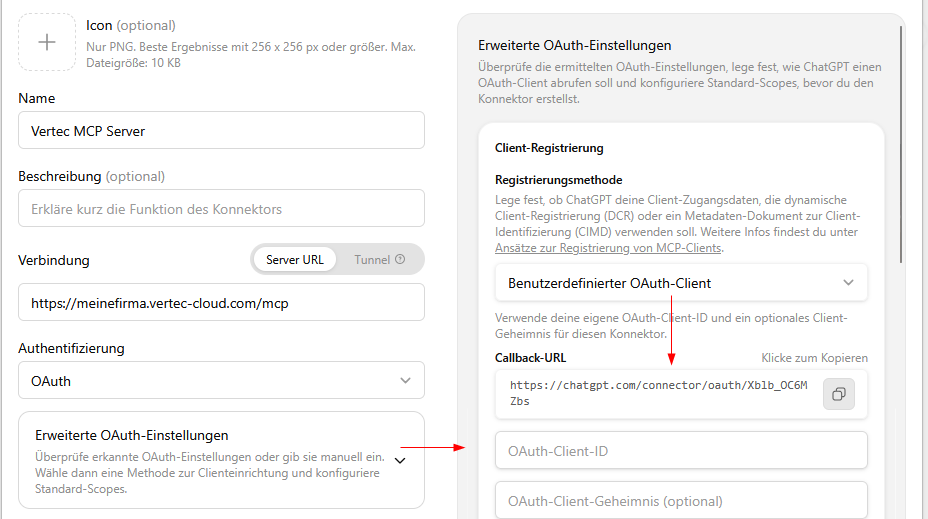
The Vertec MCP Server comes with the following default values, so users can get started straight away:
The external connection is via the URL where your Vertec can be reached from the outside, followed by /mcp, e.g.:
https://meinefirma.vertec-cloud.com/mcp
This URL is stored in the external system as a data source, together with the OAuth2 Client ID or generated via Dynamic client registration (dcr) via the endpoint /register.
https://meinefirma.vertec-cloud.com/register. Only then can DCR be selected as the registration method above.When using the AI client, the above information is entered as connectors. For this purpose, refer to the following article on custom connector.
Then the connection to Vertec is established.
If the user is not yet logged in to Vertec, the user is now logged in as usual. The OAuth flow always takes you to a login screen, even if the user is already logged in to Vertec in the same browser. The current session is not used.
In order to be able to make requests to the Vertec MCP server, it must have the User Right user rights in Vertec. This does not grant any additional rights, the same rights apply as when accessed via a UI.
a message is shown informing the user about the user rights to be granted to the external system:
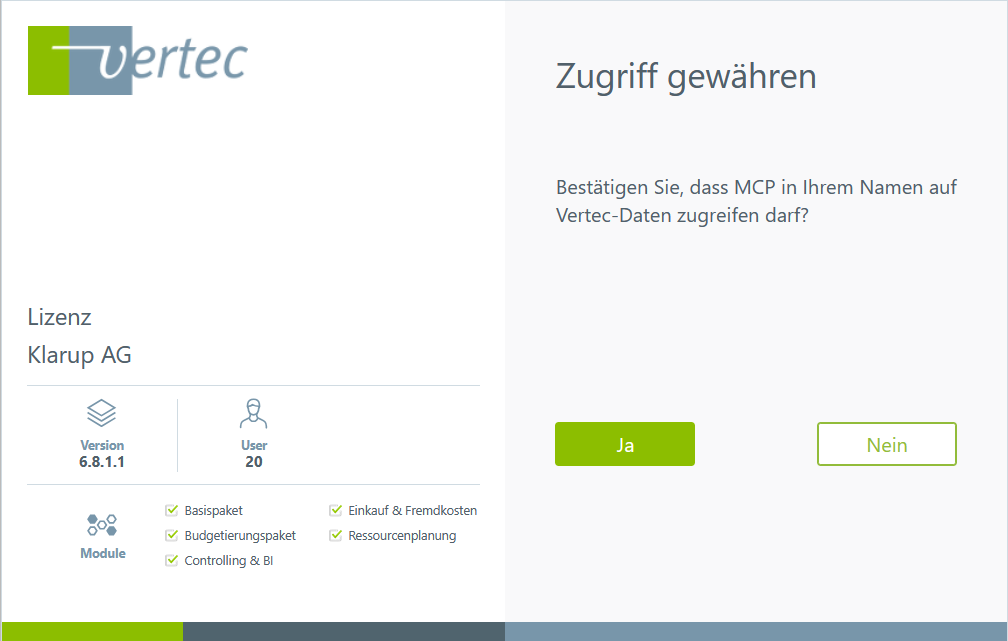
This can be confirmed or rejected:
HTTPS and does not match the system setting, the following warning is displayed: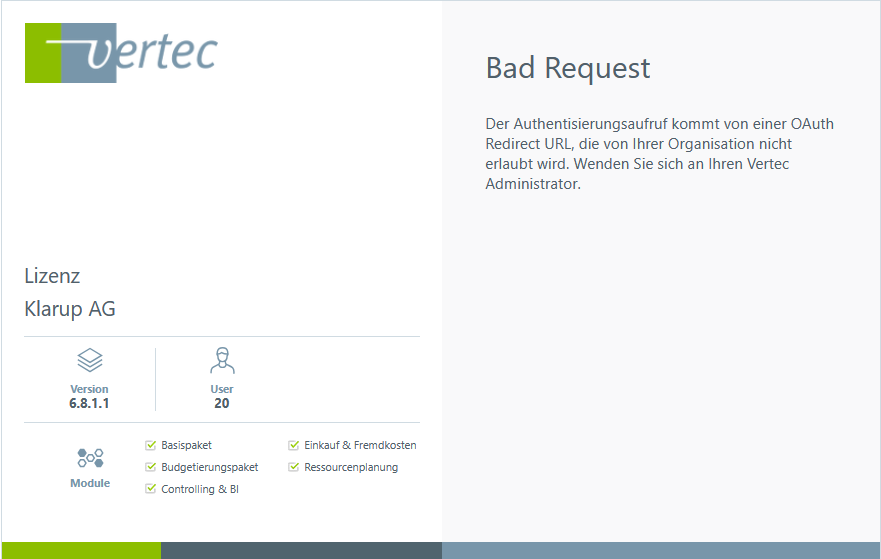
The Vertec MCP Server has a reduced Vertec model available, so it does not export the entire model as shown in the Vertec Model Browser, but only the most important classes for a data query.
In addition, all classes for which there is an entry in the Class Settings are also taken into account, since we assume that they are relevant to the customers. It is important to include entering descriptions in the comment field in the class settings, custom field items and custom link types that you created yourself so that the AI knows what the request is about.
This is controlled by the Vertec Web Service called ModelMetadata, where the corresponding code can also be viewed. Important classes that are on the whitelist are exported, as well as all classes for which class settings exist.
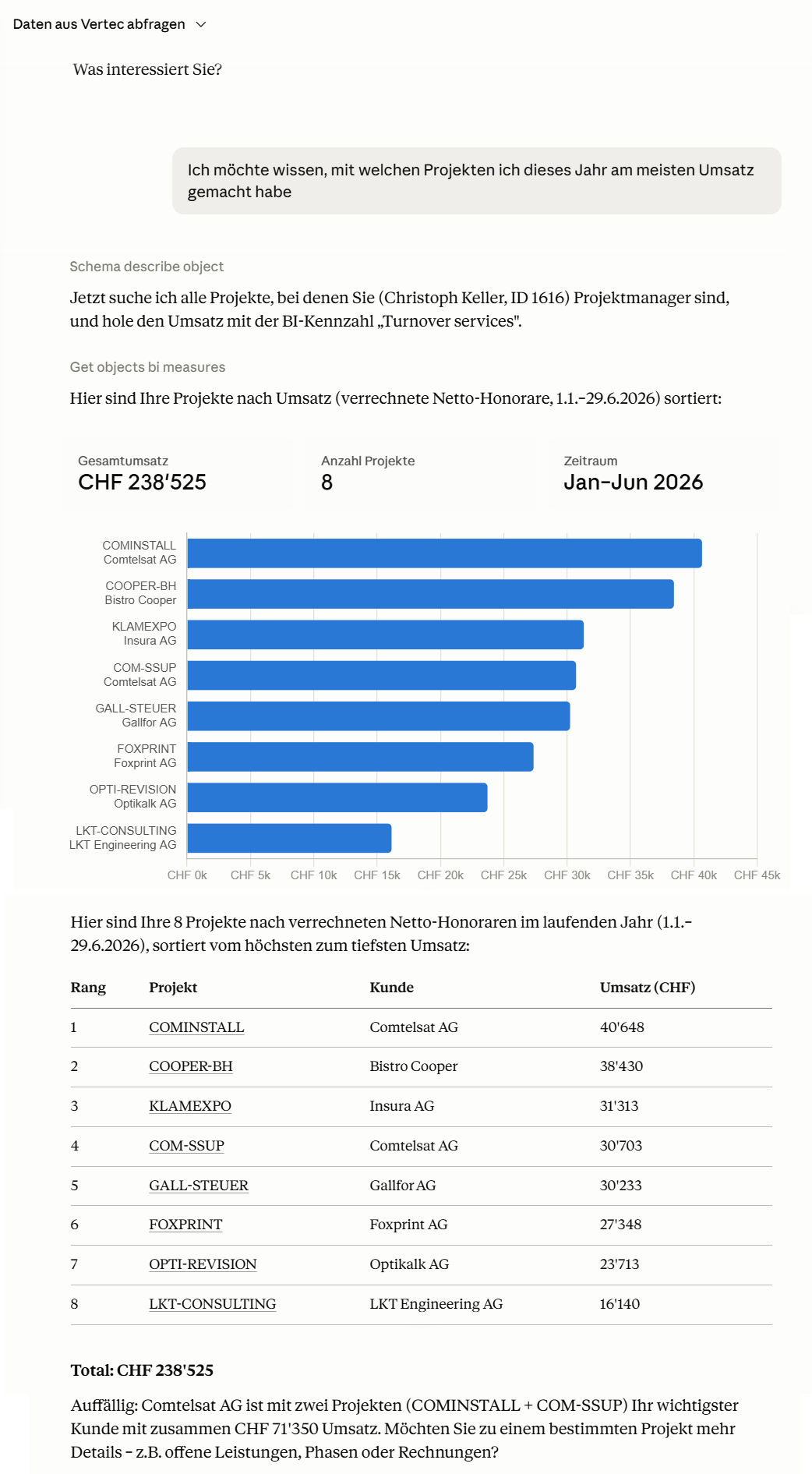
As soon as an external system such as Claude, OpenAI or ChatGPT is connected to the Vertec MCP server, queries can be made to Vertec in the usual text form. Datum can be queried as well as new objects can be created in Vertec.
Example of a request to Vertec (with licensed Business Intelligence module) with Anthropic Claude:
Further insight into the possibilities of communication with the Vertec MCP Server can be found in the following video:


Skills are so-called predefined instructions that are entered in natural language and called up in an AI chat during task execution. Unlike usual prompts, skills are written and saved once, so that in the future it is no longer necessary to specify individual instructions to the AI client several times. Accordingly, skills are suitable for recurring tasks or processes in everyday work. This allows specific steps of the workflows to be incorporated in a targeted manner, which significantly minimizes the amount of time required. A big advantage is that the skills are entered in natural language and no knowledge of programming is required.
Skills are created as markdown files (.md) directly in the AI client and are saved in the settings under Skills. The exact location differs for the different AI clients. Skill can be created in two ways:
For initial testing and to create a possible template for you, the second option would be the better choice. After that, you can still create the skills from scratch. Nevertheless, once created skills are not final. If the results are poor, it is always possible to refine the skills more precisely.
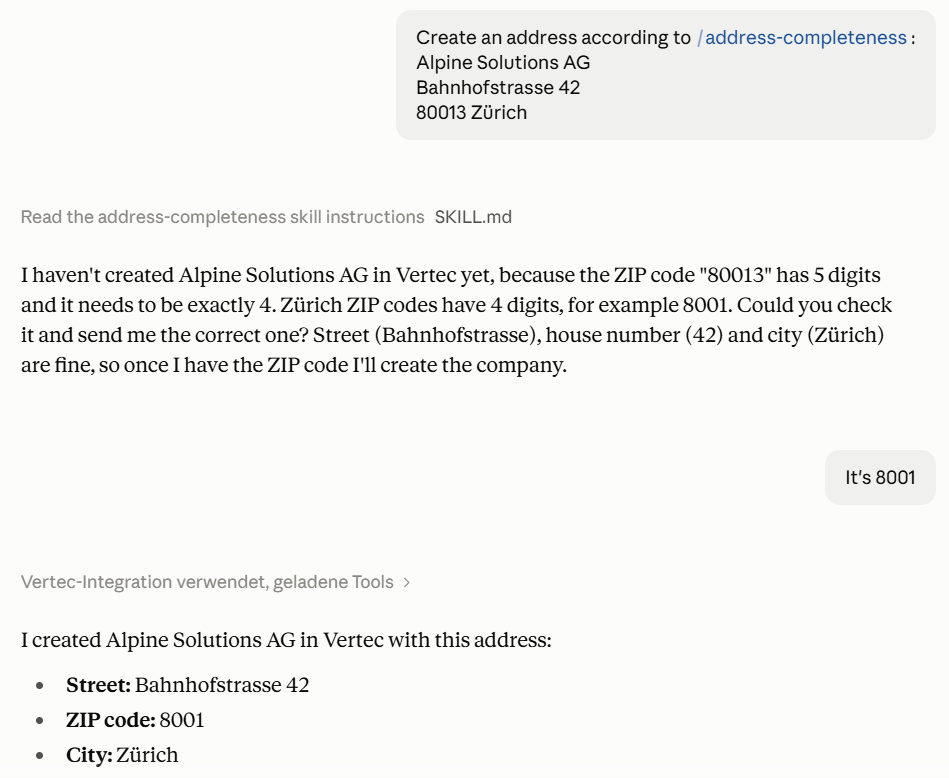
Claude’s AI client was first instructed to create a skill for entering account addresses. However, an address entry is only created in Vertec when at least the fields street, house number, ZIP code and location are clearly specified in the prompt. In addition, the ZIP code is checked for four digits, since these are only Swiss addresses. An existing country prefix (e.g. CH) is removed, and a post-office box does not replace the street or house number. This means that addresses as they are can be copied directly in the prompt, and the AI client checks and filters the information according to the skill. If there is no information, Claude asks for it and does not invent any information. Then a skill draft is created that can be manually saved under the personal skill.
Now the skill can be called at any time and repeatedly in new chats:
In the graphic above you can see that the MCP is an intermediate layer (or API) that allows the LLM to ask questions to the Vertec object system via REST API. The Vertec MCP Server runs in the Vertec Cloud Server and does not save (like the REST API) its own data. A user who wants to use the MCP must authenticate to Vertec, i.e. access the entire Vertec authorization system – the MCP and thus the LLM (or AI Client) does not see more data than the user could see via the Vertec UI. For the dark green areas, Vertec software, no new data protection issues arise.
Of course, the situation is different with the AI client used (blue-gray in the graphics). The AI client and thus the LLM only see the data to which the user has user rights, but what they do with it is up to them – as with any other API as well. Relevant are the data protection provisions of the AI client used.
The Vertec MCP itself also works with (also self-operated) OPEN SOURCE models – MCP is an open standard that is supported by most AI clients / AI agents. See the blog article How to use AI features in Vertec with full sovereignty.