Duplicates check for addresses
How to use the duplicates check in Vertec
Operating mode
 Cloud Suite
 On-Premises
Modules
CRM
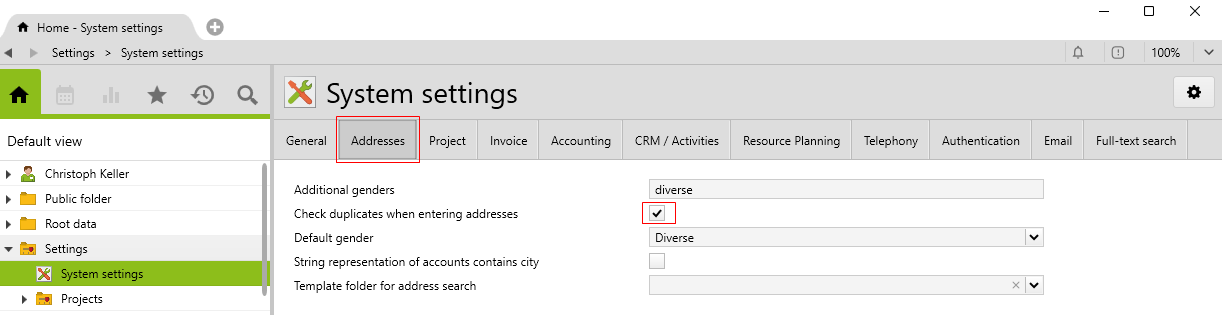
To activate this feature, go to System settings > Address and tick the Check duplicates when entering addresses checkbox.
A check is then made to see if an address with the same name already exists in the CRM. The comparison is performed as a substring comparison between the new and existing values, without different notations.
The duplicates check is triggered when the following fields are changed:
| Class | Fields | What is being searched |
|---|---|---|
|
Account |
Last, first name |
All accounts |
|
Person |
Last, first name |
All persons |
|
SimpleAddress |
Last, first name, |
All simple addresses |
|
Contact |
Last, first name, |
Contacts on the same account or in hierarchy (parent/subsidiary companies) |
|
Couple |
Last, first name, person assignment |
Couples |
For persons, simple addresses and contacts, the duplicates search is only started if the first and last names are not empty. Substrings are also compared (case insensitive).
For couples, first and last names must be entered on both persons, or both persons must be selected. First name and last name must be identical (case sensitive).
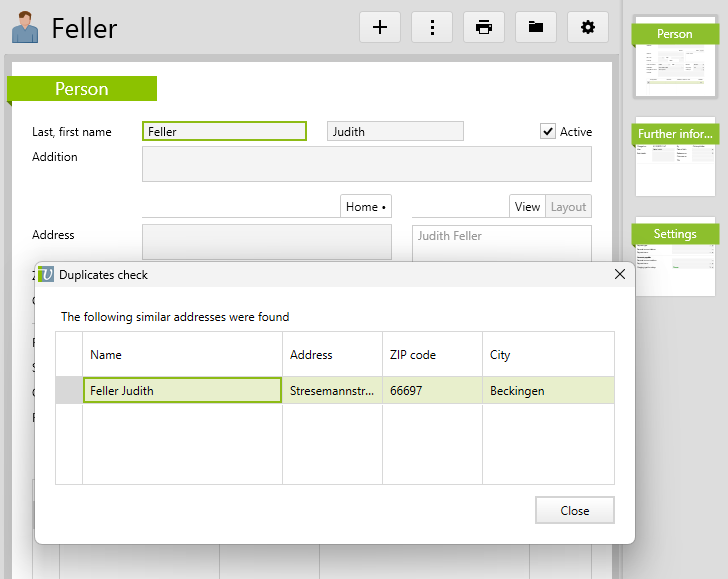
If duplicates are found, they are shown in a list and can be opened by double-clicking. However, the entered value is accepted.